


Known Participant
February 25, 2018
Answered

How to extrude shapes created in Photoshop?

  • February 25, 2018
  • 1 reply
  • 2654 views

I made a  logo in Photoshop and I'd just like to bring its shapes into After Effects and extrude them as 3D.

I've managed to get the shapes into After Effects by copying the paths in Photoshop and pasting them as masks (though this method means manually lining them up, which is a bit clumsy).

The trouble is, you can't extrude a mask, so I need them as shapes.

In order to turn a mask path into a shape, I created a new shape layer, added a path, then copied the mask path into the path parameter. The path does appear in the shape, but when I add a fill or stroke, no fill or stroke appear! The path just remains as an outline.

See image:
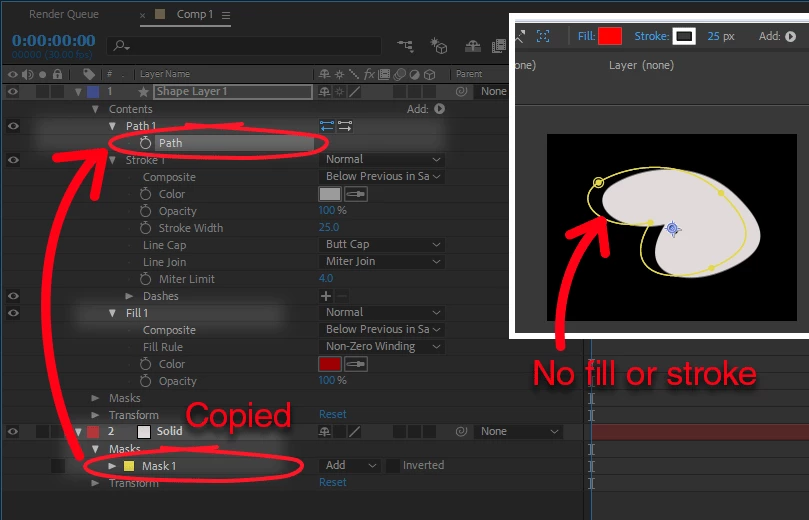
(I'm fairly new to After Effects so please forgive my ignorance here.)

This topic has been closed for replies.
Correct answer Roland Kahlenberg

I believe you've copied the Mask (its folder) rather than the Mask Path. Twirl down the arrow to the left of the Mask 1 label. You wlil see a property named "MasK Path". Select Mask Path property and copy it. Then select the Shape Layer's Path property and commit to a paste routine.

Don't forget to switch off the Solid Layer. Your insert image is a visual representation of your Mask. It's actually confusing putting it up there.

HTH

1 reply

Roland Kahlenberg
Roland KahlenbergCorrect answer
Legend
February 25, 2018

I believe you've copied the Mask (its folder) rather than the Mask Path. Twirl down the arrow to the left of the Mask 1 label. You wlil see a property named "MasK Path". Select Mask Path property and copy it. Then select the Shape Layer's Path property and commit to a paste routine.

Don't forget to switch off the Solid Layer. Your insert image is a visual representation of your Mask. It's actually confusing putting it up there.

HTH

Very Advanced After Effects Training | Adaptive & Responsive Toolkits | Intelligent Design Assets (IDAs) | MoGraph Design System DEV
Lee JamesAuthor
Known Participant
February 25, 2018

Thank you so much Roland! That was indeed the problem!