
Participating Frequently
July 7, 2022
Question

How to fix error: expected ;

  • July 7, 2022
  • 2 replies
  • 2595 views

Hello! So I have been following this tutorial below to try to make my own ranking system in AE:


https://youtu.be/STw_ZIw3uVE 


I've followed the tutorial step by step when typing the code but then I came into this issue below which puzzles me since I have already placed the semicolon in that line.
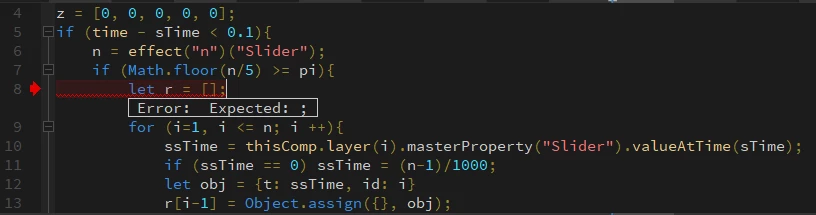


Anyone know what I can do this fix this? Cheers!!

This topic has been closed for replies.

2 replies

Mylenium
Legend
July 7, 2022
Object.assign({}, obj)

It probably should read object.assign. Case-sensitivity matters in JS...


Mylenium

Participating Frequently
July 7, 2022

I'll give it a shot but iirc, the error message popped up before I even typed in that line 😕😕

Participating Frequently
July 7, 2022

Just in case anyone wants to see the entire code, here it is!: 

pi = 0;
dt = effect("RankTransTime ")("Slider");
sTime = Math.floor(time/dt)*dt;
z = [0, 0, 0, 0, 0];
if (time - sTime < 0.1){
    n = effect("n")("Slider");
    if (Math.floor(n/5) >= pi){
        let r = [];
        for (i=1, i <= n; i ++){
            ssTime = thisComp.layer(i).masterProperty("Slider").valueAtTime(sTime);
            if (ssTime == 0) ssTime = (n-1)/1000;
            let obj = {t: ssTime, id: i}
            r[i-1] = Object.assign({}, obj);
        }
    r.sort(function(a,b){return b.t - a.t});
    for (i = 1; i <= 5, i++){
        z[i-1] = r.findIndex(function (a){return a.id == i + (pi*5)}/20;
    }
    }
}
Dan Ebberts
Community Expert
Community Expert
July 7, 2022

My guess is that you're using the Legacy ExtendScript expression engine instead of the JavaScript engine. Change that in File > Project Settings > Expressions.


Participating Frequently
July 7, 2022

Oh the codes before did not work until I changed it to the Legacy Extendscript engine before though. Will changing it back affect the previous codes?