
Inspiring
May 16, 2016
Question

How to get rid of the "Starting Composition" scripting alert?

  • May 16, 2016
  • 3 replies
  • 1307 views

Hi,

I'm trying to use a script to render a composition from AE project from the command line, but each time I keep getting the modal dialog like this:
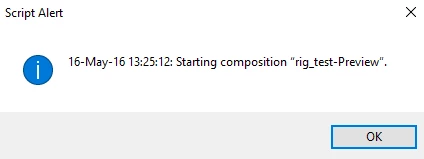
AE doesn't start rendering, until I hit OK, and I have no idea how to make this warning go away.

Any ideas?

This topic has been closed for replies.

3 replies

krisw51503023
Participating Frequently
May 14, 2017

found the issue on this. Somewhere along the line a library I was using has the lines:

function err(errString) {

        alert(errString) ;

    }

    app.onError = err;

Which looks benign because it appears only "errors" but I guess all the debug is being sent through as errors behind the scenes, including start/stop rendering info and it was converting them to alerts. Removed this, restarted AE( because it had cached it for some reason) and no longer occurring.

UQg
Legend
May 14, 2017

If you look at the CommandLineRenderer.jsx script (native script that comes with AE, to be found in Scripts/Startup, you'll see that unlike what is stated in the guide, app.onError has 2 arguments, the second one being the 'severity' of the error, so that you can filter your alert.

Xavier

krisw51503023
Participating Frequently
May 13, 2017

did anyone ever find out what this is? This just started happening on my script, no idea why and can't see if I clicked on anything. It's basically sending logging info to alert boxes every time it starts and stops rendering, these are not being generated by my script. Almost like AE debug kind of info, though Enable Logging is turned off.

Alex White
Legend
May 16, 2016

Hi Bart,

Can't tell you exactly without script code, but if you will remove alert inside the code that contains "Starting composition"... , this might help you.

Inspiring
May 16, 2016

And if I do not have such an alert in my code?

UQg
Legend
May 16, 2016

There are app.beginSuppressDialogs() and app.endSuppressDialogs(showAlerts) that might help if the dialog was created by the application.

Xavier