nooshina76115334
Participant
October 12, 2017
Answered

How to give an expression to an effect?
  • October 12, 2017
  • 2 replies
  • 832 views

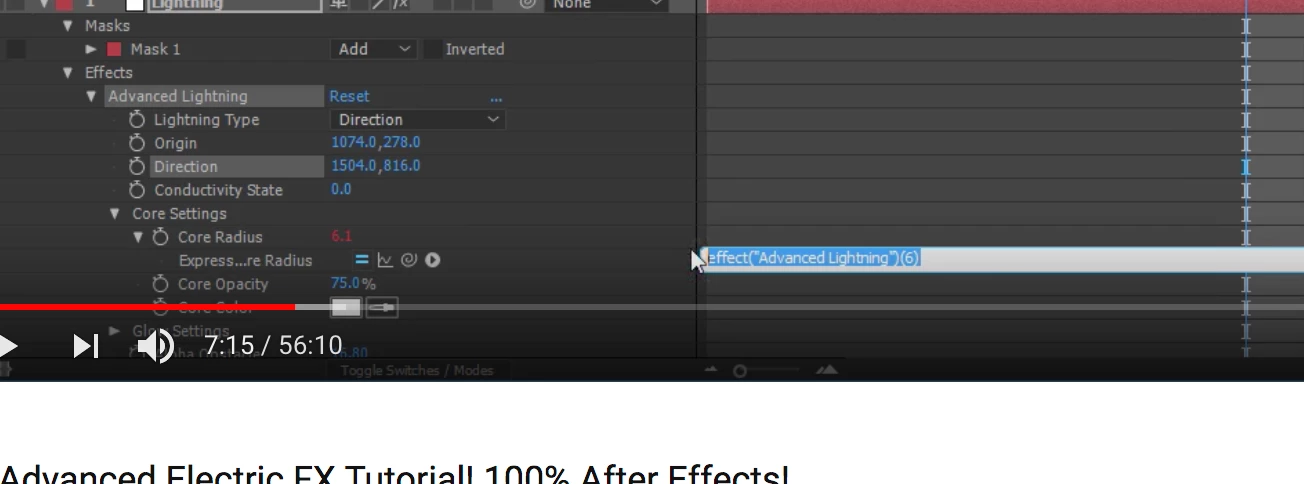
I'm a beginner in After effect ( also I amateur in Ps, Ai and Id ) so Anyone knows how can I reach to that Express Radius  part ?????

I have cc 2017 version of AE by the way.

This topic has been closed for replies.
Correct answer nooshina76115334

Hi Rick

Thank you for your answer. I just figure out ho w to do it. " need to Alt+click on the stopwatch to get the writing line which it was my question.

But you really motivated me but answering back with all those background of yours.

And I will certainly check the basics on AE.

2 replies

dnbstudios
Inspiring
October 12, 2017

What Andrew Kramer was teaching you in that part of the tutorial is how to add a random generator to the core radius of the lightning effect. You could just add a bunch of keyframes and change the values to make the lightning change its appearance, but adding a "wiggle" to it makes the effect change randomly. Looking at your screen shot - you're in the right place. That code text you see there is highlighted in blue. That means it's selected. Just hit delete (or start typing) and you can add new code. Andrew wanted you to add the text "wiggle(7,3)" then hit the enter key on the numeric part of your keyboard. (The return button on the alpha keyboard just adds a new line, the enter button exits this section of code.) Or you could just click away.

That should get you where you're going. Good luck!

nooshina76115334
Participant
October 12, 2017

Exactly I couldn't create that line to add that wiggle, and I'm using mac keyboard so I don't have numeric section though I could finally activated that line with Alt+click on the effect.

Thank you

Community Expert
October 12, 2017

You need to spend some time learning the basics of expressions and the use of the pickwhip. Please spend some time in the help files.

I am not exactly sure what you want to do. If you created that expression it is already It is not doing anything. The first part effect("Advanced Lightning") does call out the name of an effect applied to that layer but there is no parameter in Advanced Lightning named "6" so (6) or even ("6") is meaningless. If you want to set the radius to six then your expression is just 6.

Please take the time to at least read the help files or go the After Effects product page and click on the link New to After Effects? Get the basics and spend some time learning. You'll never get it by just poking around and fiddling with the knobs.

nooshina76115334
nooshina76115334AuthorCorrect answer
Participant
October 12, 2017

Hi Rick

Thank you for your answer. I just figure out ho w to do it. " need to Alt+click on the stopwatch to get the writing line which it was my question.

But you really motivated me but answering back with all those background of yours.

And I will certainly check the basics on AE.