

How to Import GLB / FBX with Baked Cloth Animation?
I am working in Cinema4D and After Effects. In C4D, I have a simple plane with a cloth simulation to deform its geometry - a flag animation.
The sim has been cached, then converted to Point Level Animation (PLA) keyframes. There are no other keyframes on the model.
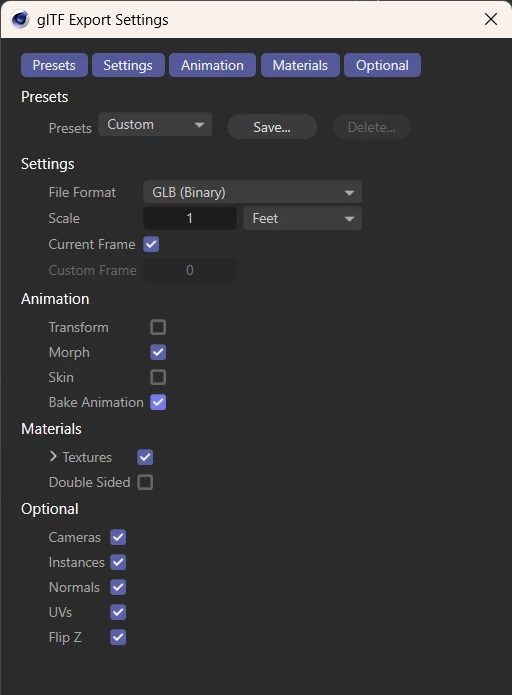
Here are my GLB / FBX export settings:
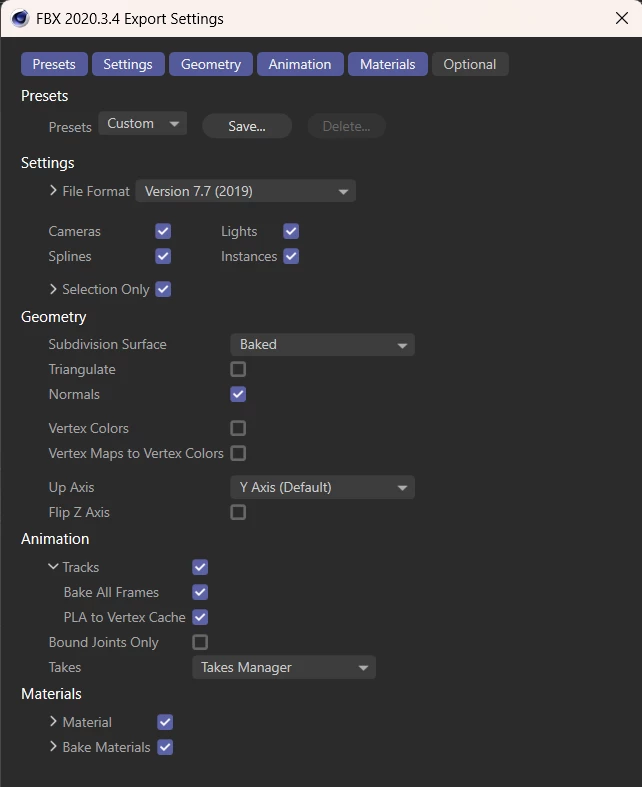
Importing the FBX back into Cinema4D, the textures and animation play down without issues.
In AE, the FBX has no Animation dropdown. The GLB does have an Animation dropdown, but it is stuck on a single frame. Textures and everything import with no issues. Essentially, everything looks fine except the flag is not animating - it is frozen on the first frame.
Is this type of PLA animation possible to transfer over to After Effects? Or is this a limitation of AE?
AE version 25.6
C4D 25.3.3
Windows 11


 AdChoices