

How to keep the 'Tools' panel on one line.
So, random question about setting up the workspace within After Effects.
I have two monitors, the left one being the 'primary' one with the Task Bar, the 'File', 'Edit' etc. bar up the top and everything. The 'Tools' panel in after effects, when it's in its default position docked at the top of this screen, is all displayed as one line, including the workspace and mask options:

However, I'd like to dock it to the top of my other screen. I can do this, but doing so forces it into a 3-line configuration instead with the 'Tools' label:
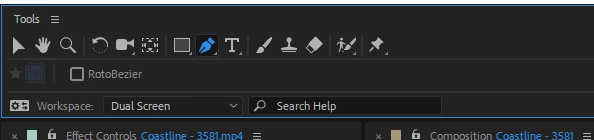
Is there any way to get the default configuration happening on the second monitor? It's incredibly nitpicky, I know, but I had my workspace set just how I liked, and some recent hardware changes have caused this muck up.


 AdChoices