
Participant
June 27, 2023
Answered

How to make a short vidéo like that ?

  • June 27, 2023
  • 1 reply
  • 330 views

Hi,

I'm a new user of Adobe and i'm little bit lost. I have some projects and want to make something in this style : https://www.youtube.com/watch?v=CzYg5Lz_P3c


It's probably easy to know how to do it for a experimented guy but, like I say, I'm beggining and I don't know where to start.


I don't know how to make the deep effect for the Neon and also how to make the neon. I think to make a brush but seems like very hard. The step with Photshop seems like impossible for me.


For the animation the glow effect etc, I have a good idea how to make there so it's not a problem, same for the transition and else but for the tracking i don't really know.


Thank you to give me your attention.


And I want to say I probably go to sleep I search tutorials all the day x) so sorry if I don't answer fast.


Have a nice day/night.
This topic has been closed for replies.
Correct answer Rick Gerard

If I were doing a project like that, the first step would be to storyboard and sketch out each of the "hero" frames. That would be where the Text is full frame and revealed. Each of those hero positions would be a separate comp with a little extra time at the end for each of the transitions. 


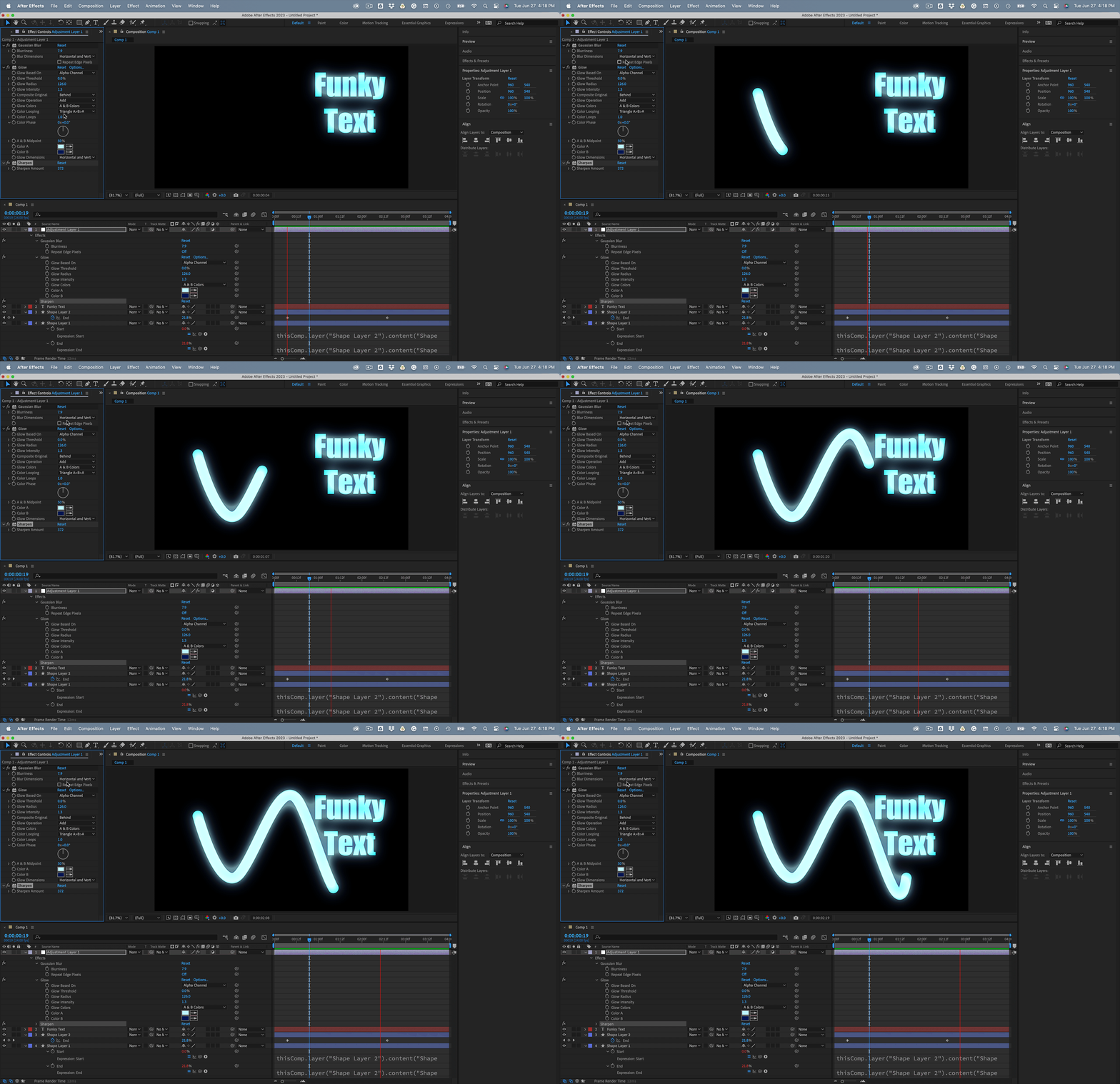
The moving line can be created by a simple shape layer path with rounded ends and corners and Trim Paths applied. The glow is fairly uniform so I would start that with an adjustment layer and a little Gaussian Blur with Repeat Edge Pixels turned off,  Glow set to Alpha channel with the threshold at zero, then a little Sharpen to bring back some of the edges. Then make the text and shape layers 3D and match the starting and ending parts of each of the animations so the comps can be seamlessly cut together. This is an example of using an Adjustment layer for color correction (glows and blurs count). That is one of the handful of things Adjustment layers are good for. 


Start with something like this, and then just start fiddling. The important part of the workflow is to make each animated segment a separate comp. Trying to create a 45-second-long movie like that using a single comp is going to get extremely complicated. When you are done, render each comp and edit the final project in Premiere Pro.


Start with something like this:

This is only one of the dozens of possible workflows to create that style of animation.  


I hope it helps get you started.

1 reply

Rick GerardCommunity ExpertCorrect answer
Community Expert
June 27, 2023

If I were doing a project like that, the first step would be to storyboard and sketch out each of the "hero" frames. That would be where the Text is full frame and revealed. Each of those hero positions would be a separate comp with a little extra time at the end for each of the transitions. 


The moving line can be created by a simple shape layer path with rounded ends and corners and Trim Paths applied. The glow is fairly uniform so I would start that with an adjustment layer and a little Gaussian Blur with Repeat Edge Pixels turned off,  Glow set to Alpha channel with the threshold at zero, then a little Sharpen to bring back some of the edges. Then make the text and shape layers 3D and match the starting and ending parts of each of the animations so the comps can be seamlessly cut together. This is an example of using an Adjustment layer for color correction (glows and blurs count). That is one of the handful of things Adjustment layers are good for. 


Start with something like this, and then just start fiddling. The important part of the workflow is to make each animated segment a separate comp. Trying to create a 45-second-long movie like that using a single comp is going to get extremely complicated. When you are done, render each comp and edit the final project in Premiere Pro.


Start with something like this:

This is only one of the dozens of possible workflows to create that style of animation.  


I hope it helps get you started.

Participant
June 28, 2023

Hello, okay thank you for your explanation, i guess now i just have to do my first step :).

Again thank you so much for your explanation. I will go try right now.

Have a nice day/night.