
Known Participant
August 2, 2018
Answered

How to make a smooth rectangle shape gradient from solid to transparent

  • August 2, 2018
  • 4 replies
  • 4637 views

I've tried 3 different ways to do this simple task. I'm new to After Effects, so I know this is a noob question.

All I want is to have a rectangle that starts a solid black color from the left, and has a smooth linear gradient

to the end (to transparent).

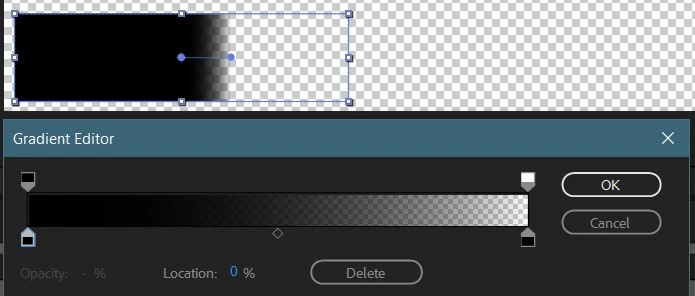
As you can see below, gradient fill color panel represents what I want (smooth and linear from left to right, black to transparent),

but the shape itself is solid until it gets to the middle, then does a quick gradient and doesn't reach the end of the rectangle.

What am I doing wrong?
This topic has been closed for replies.
Correct answer Towerguy

Hi. The two dots joined by the line on the image are the beginning and end points of the gradient - drag each of them to the beginning and end of the shape. If you look in the shape layer Contents/Gradient Fill you will also find Start point and End point settings you can change.

4 replies

u84sixAuthor
Known Participant
August 3, 2018

Thanks everyone. Everything was so helpful!

Roland Kahlenberg
Legend
August 3, 2018

For a Shape Layer-only solution, Towerguy has the correct answer. Here's a screen capture -

http://www.broadcastGEMs.com/mediaStreamer/CreateSoftTransparency_SingleLayer_ShapeLayer.mp4

Very Advanced After Effects Training | Adaptive & Responsive Toolkits | Intelligent Design Assets (IDAs) | MoGraph Design System DEV
Roland Kahlenberg
Legend
August 3, 2018

The most elegant solution I can think of is to use AE's Variable Mask Feather Tool -

Variable Mask feathering Part 1 in Adobe After Effects

Here's a screen cap I just did - I'm hopeful you'll be able to follow along. What's not obvious but important is me double-clicking on the Quick Mask Tool at the 51-second mark - this creates a mask (based on the currently active Quick Mask Tool/Shape) which adheres to the outline of the selected layer(s).

http://www.broadcastgems.com/mediaStreamer/CreateSoftTransparency_SingleLayer_MaskFeather.mp4

Very Advanced After Effects Training | Adaptive & Responsive Toolkits | Intelligent Design Assets (IDAs) | MoGraph Design System DEV
TowerguyCorrect answer
Participating Frequently
August 2, 2018

Hi. The two dots joined by the line on the image are the beginning and end points of the gradient - drag each of them to the beginning and end of the shape. If you look in the shape layer Contents/Gradient Fill you will also find Start point and End point settings you can change.