
Participating Frequently
February 14, 2025
Question

how to make the text seems as if it was written on the road and revealed by the car?

  • February 14, 2025
  • 4 replies
  • 766 views

hey (:


i have a drone shot with a driving car across it (top to bottom). i want to have the car "revealing" text "written" on the road but i cant seem to get it perfectly like i want.

heres an image of the relevant part of the shot
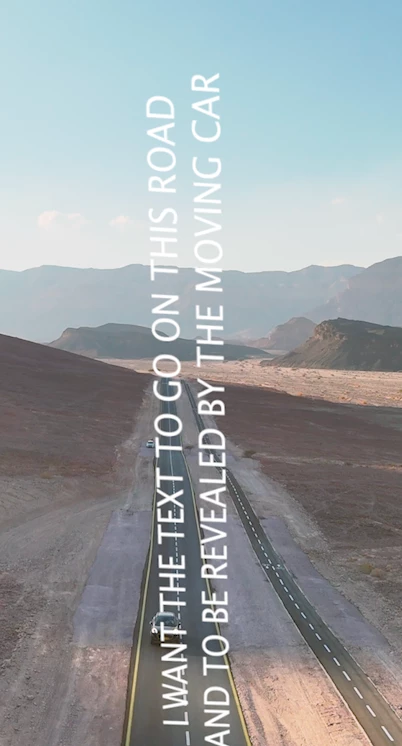
i tried using all adobe softwares like many tutorials said - combing Illustaror and photoshop and after effects and premiere but i just cant actually get it the way i want

the most frustorating part is that i did that 4 years ago!


so any help would be much appriciated 


thank you ❤️

4 replies

nishu_kush
Legend
February 17, 2025

Thanks for reaching out.

3D camera tracking should help you achieve it. Here's a quick YouTube tutorial showing how you can attach text to the wall but with the same technique you can attach text to the ground: https://www.youtube.com/watch?v=E1rduZmW_xI&ab_channel=SmertimbaGraphics

Here's a tutorial that explains 3D tracking in depth: https://www.youtube.com/watch?v=YzUa-Kr2ntY&ab_channel=JakeInMotion

Let us know how it goes.


Thanks,
Nishu

Bojan Živković11378569
Community Expert
Community Expert
February 15, 2025

If you don't mind editable text, use Filter > Vanishing Point. Select the text, copy it, then define the perspective in the Vanishing Point filter and paste the copied content. Reposition the pasted content as necessary.

Participating Frequently
February 15, 2025

Thank you for your quick reply! 🙏

and how to convert it to the video with motion track in a way that it'll follow the car with the right change in size along the way?

Trevor.Dennis
Community Expert
Community Expert
February 15, 2025

You would need After Effects to have any chance of doing that, if I am understanding what you want to do.  With something as complex as this, you need to give much more detail than you have so far, preferably with diagrams or example video.

Nancy OShea
Community Expert
Community Expert
February 15, 2025

In Photoshop, select the Type Layer. 

Go to Image > Transform > Perspective. 

If Perspective isn't available, right-click Type Layer and convert to Smart Object.

Adjust Perspective points as required.


Nancy O'Shea— Product User & Community Expert
Participating Frequently
February 15, 2025

Thank you for your quick reply 🙏

and how to convert it to the video with motion track in a way that it'll follow the car with the right change in size along the way?

Peru Bob
Community Expert
Community Expert
February 15, 2025

I've moved this from the Using the Community forum (which is the forum for issues using the forums) to the Premiere Pro forum so that proper help can be offered.


Scroll down here to see a list of the forums:
https://community.adobe.com/