
Inspiring
August 26, 2017
Answered

How to make this message disappear..."no selected properties have expressions"

  • August 26, 2017
  • 2 replies
  • 12696 views

Hi all,

When I'm in the graph editor, the following message is permanently displayed at the bottom of the screen: (no selected properties have expressions.)

I haven't noticed this before but it started displaying about a week ago. It's a but annoying as it takes up a row that would otherwise be graph space.
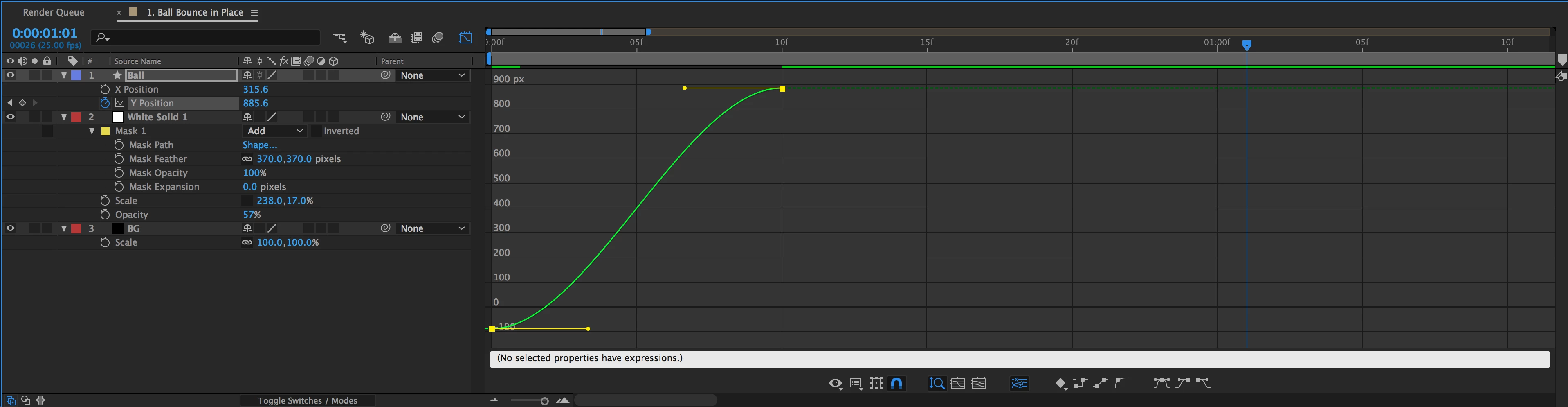
Does anyone have a suggestion on where I can turn this off? I can't find it and I've searched Google and the forums for an answer too.

Thank you

Mal

Late 2013 15" rMPB

2.6GHz i7

512GB SSD

nVidia GeForce GT 750M

16GB RAM

Correct answer Rick Gerard

You have turned on the expression editor. That is all there is to it. This is not an error message so you can ignore it.

2 replies

Participant
January 24, 2020

Hi Rick,

this is actually happening to me and I need the expressions for the properties. Do you know how to make sure there are expressions for the properties?

Rick GerardCommunity ExpertCorrect answer
Community Expert
August 27, 2017

You have turned on the expression editor. That is all there is to it. This is not an error message so you can ignore it.

malowensAuthor
Inspiring
August 27, 2017

Thanks for the response Rick. I don't have any expressions on any keyframes. It's just a message that's always present.

So it shouldn't be showing in the first place.

Sent from my iPhone

Community Expert
August 27, 2017

The message just says you don't have expressions. If you don't want to see it then close the expression editor by clicking on the second icon from the left in the Graph Editor. That message has been there for quite a while, maybe as long as the graph editor has been available.