Inspiring
April 20, 2022
Question

How to merge multi expression controls by scripting

  • April 20, 2022
  • 1 reply
  • 1312 views

I want to merge multi expression controls to one effect.

Please tell me how to make original control effect like the attached image.


I thought the addProperty() method help me but could not reach the correct answer.
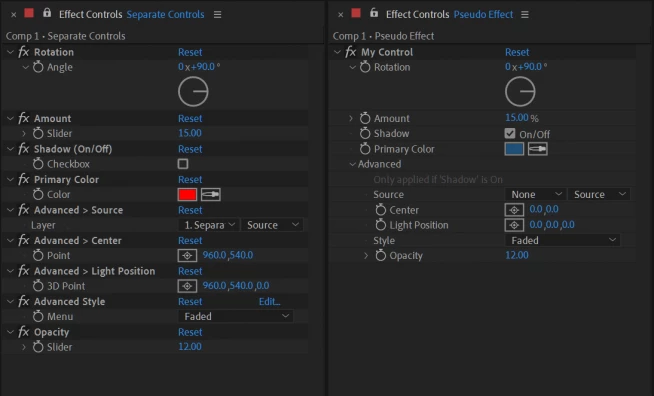
 

This topic has been closed for replies.

1 reply

Inspiring
April 20, 2022

There's this: https://aescripts.com/pseudo-effect-maker/

But I guess you already know that as you grabbed your image from there. And then a google search for 'pseudo effect after effects' gives me a bunch of results including this tutorial:

https://www.premiumbeat.com/blog/creating-pseudo-effects-in-after-effects/

Where you can see that these pseudo effects are created by adding to AE's PresetEfects.xml file. I presume that is what the above script is doing and you'll need to code something similarly complex to achieve this. There's no magic 'make pseudo effect' scripting command.

Inspiring
April 20, 2022

Thank you! You've opened the way for me.


But after proceeding for a while, I faced a new problem again...


I went ahead with this video and the binary is magical. I could not customize the effect I want.

https://youtu.be/FOazhcjKFYU

Inspiring
April 20, 2022

If your aim is to distribute a pseudo effect designed by yourself from inside a script then yes, after creating and applying it manually in After Effects, saving it as a .ffx animation preset then embedding that in your script would be a good way to do this. Then your script would just need to write that .ffx file to the user's computer and use applyPreset to apply it. I don't see any reason that wouldn't work.