
Participating Frequently
June 7, 2025
Answered

How to Parent All Layers to First Layer in Another Comp Using Automation Blocks (Sometimes Not Worki

  • June 7, 2025
  • 2 replies
  • 527 views

Hi everyone,

I’m working with Automation Blocks for After Effects and running into an issue when trying to parent all layers in one composition to the first layer.

Here's what I'm trying to do:

I have two compositions:

  • 4kcomp

  • 2kcomp

I want to parent all layers in 2kcomp to the first layer inside it, using a script built with Automation Blocks.

What works:

When I open 2kcomp first and run the script, it works correctly — all layers are parented to the first one.

What doesn’t work:

If I open 4kcomp and run the script (without manually opening 2kcomp first), the script runs but doesn’t parent anything. It seems like the layers in 2kcomp aren’t being accessed or recognized properly unless that comp is opened manually beforehand.

Question:

Is there a reliable way in Automation Blocks to make sure all layers of a non-active comp (like 2kcomp) are accessible and parented correctly?
Do I need to “force open” or “activate” 2kcomp before looping through its layers?

Here’s a simplified version of what I’m doing in the block logic:

  1. Get comp by name (2kcomp)

  2. Loop through all layers (starting from index 2)

  3. Set each layer’s parent to layer index 1

Any help, tips, or a better workaround would be greatly appreciated!

Thanks in advance!
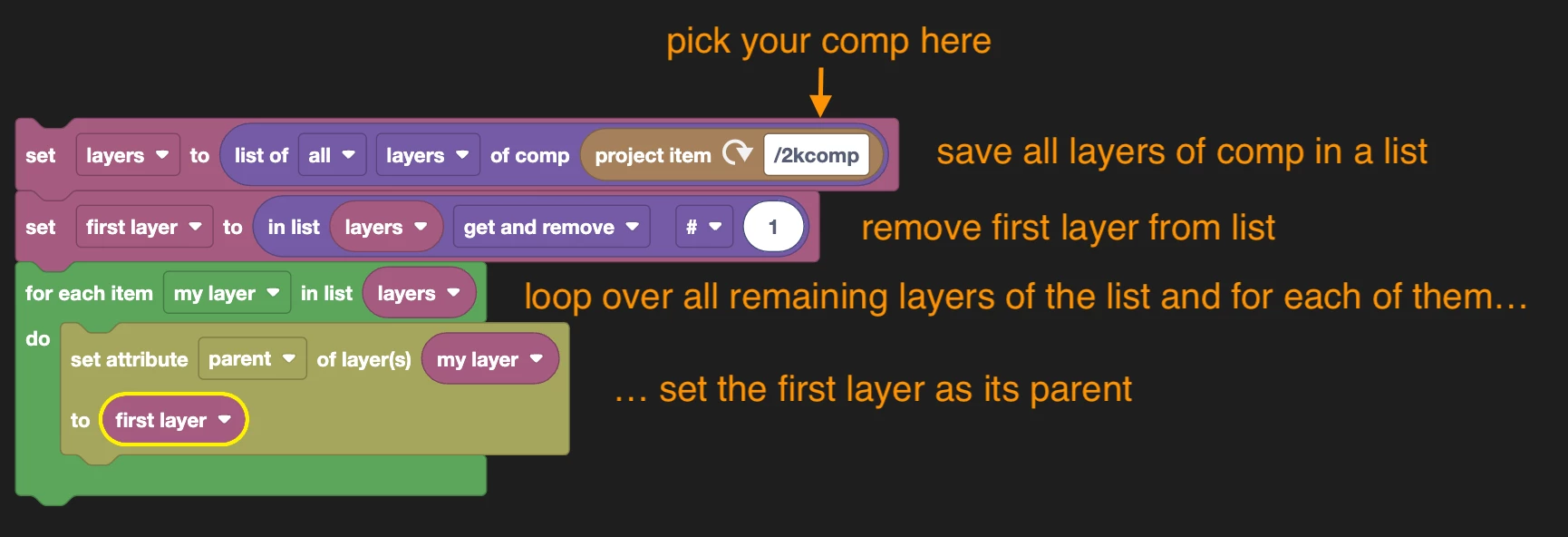
Correct answer Mathias Moehl

I just tested with this little sample code and it works fine for me also if the comp "2kcomp" is not the active comp.
(block code xml attached such that you can try yourself)


2 replies

Mathias Moehl
Community Expert
Mathias MoehlCommunity ExpertCorrect answer
Community Expert
June 7, 2025

I just tested with this little sample code and it works fine for me also if the comp "2kcomp" is not the active comp.
(block code xml attached such that you can try yourself)


Mathias Möhl - Developer of tools like BeatEdit and Automation Blocks for Premiere Pro and After Effects
Participating Frequently
June 8, 2025

Thanks so much, Mathias Moehl — your code is working perfectly now! 🙏
I really appreciate your help.

Honestly, I’m still not sure why my previous setup wasn’t working — the logic seemed correct, but clearly something was off. Either way, it’s all running smoothly now thanks to your guidance.

Much appreciated! 🙌

Mathias Moehl
Community Expert
Community Expert
June 7, 2025

This sounds like at some point in your code, you accidentally use "active comp" instead of the comp yoou retrieved by name. Are you able to share your block code and post a screenshot?

Mathias Möhl - Developer of tools like BeatEdit and Automation Blocks for Premiere Pro and After Effects