

bschaefer6
Inspiring
April 7, 2023
Answered

How to Pre-compose/group layers the are wider than my composition?

  • April 7, 2023
  • 2 replies
  • 459 views

I'm trying to group together multiple objects but together their width is wider than my composition so when I Pre-compose it slices off the sides of my grouping. How can I group these objects that as a whole are wider than my composition?
This topic has been closed for replies.
Correct answer Warren Heaton

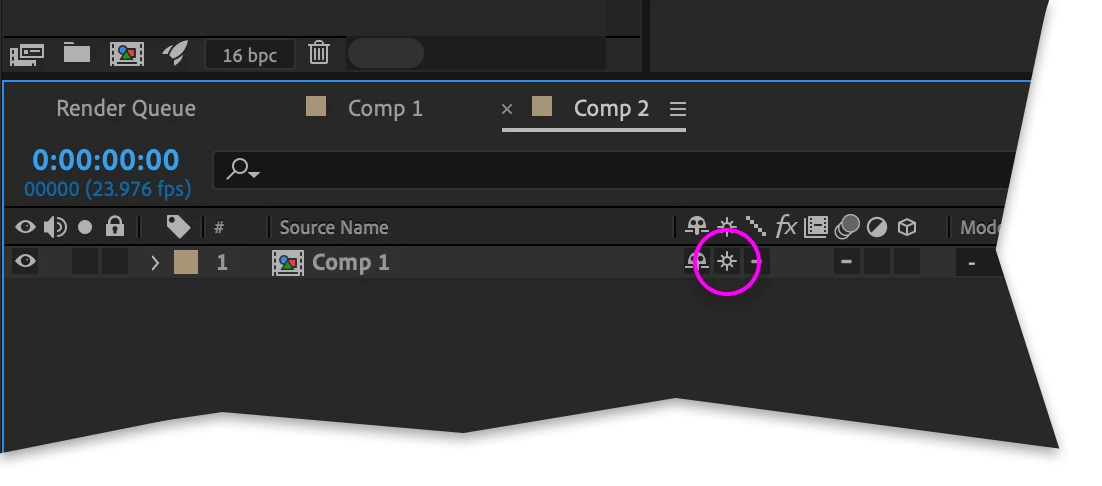
One option is to enable the "Collapse Transformations" Switch for the nested Comp, allowing Layers outside of the visible area of the nested (upstream) Comp to be seen in the containing (downstream) Comp.


For more on this option, go to https://helpx.adobe.com/after-effects/using/precomposing-nesting-pre-rendering.html and scroll down to "Render order and collapsing transformations".

2 replies

Warren Heaton
Community Expert
Warren HeatonCommunity ExpertCorrect answer
Community Expert
April 7, 2023

One option is to enable the "Collapse Transformations" Switch for the nested Comp, allowing Layers outside of the visible area of the nested (upstream) Comp to be seen in the containing (downstream) Comp.


For more on this option, go to https://helpx.adobe.com/after-effects/using/precomposing-nesting-pre-rendering.html and scroll down to "Render order and collapsing transformations".

Mylenium
Legend
April 7, 2023

You have to adjust the comp size of the pre-composition after the fact most of the time. AE's pre-compose logic is simply not smart enough to deal with this scenario. I believe there is a script that can help on AEScripts.com, so check the site.


Mylenium