
Inspiring
January 8, 2026
Answered

How to remove "3d camera tracker doesn't work with time remapping" message

  • January 8, 2026
  • 1 reply
  • 98 views

I tried tracking some footage but the analysis failed.  Now my preview has a red banner across it saying, "3d camera tracker doesn't work with time remapping" and I can't get it to go away.  I've even tried closing and reopening AE.  Any tips?
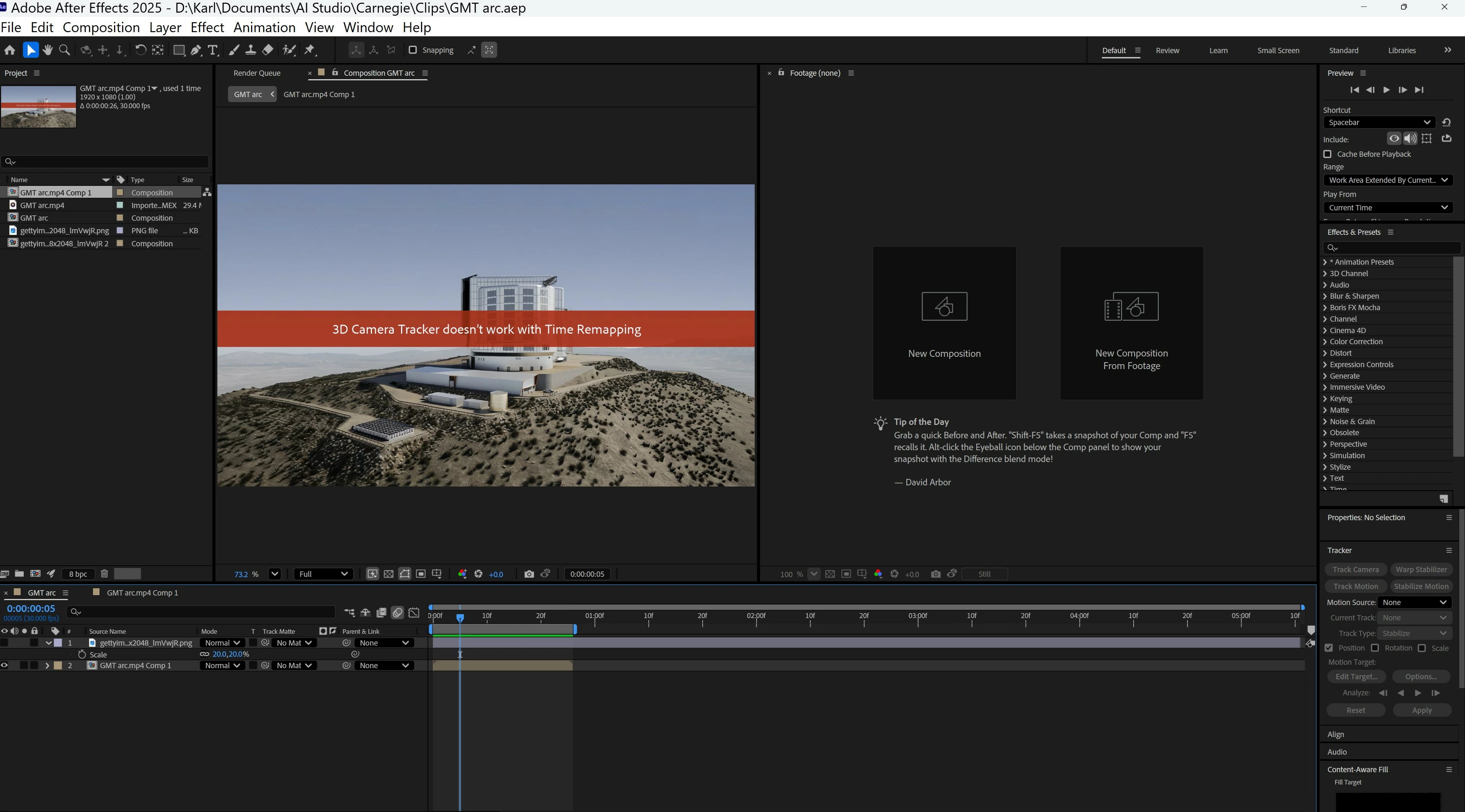
 

AE red banner.jpg

Correct answer ShiveringCactus

The 3D camera tracker applies itself as an effect.  If you select the footage and go to the Eff3cts Control panel, you should be able to delete the effect.

if you're still wanting to try to track the footage, @SternFX has some good tutorials that can help, like this one: https://youtu.be/KzcwDqDuRC0?si=YeXtktHM4nx1wdIc 

1 reply

ShiveringCactus
Community Expert
ShiveringCactusCommunity ExpertCorrect answer
Community Expert
January 8, 2026

The 3D camera tracker applies itself as an effect.  If you select the footage and go to the Eff3cts Control panel, you should be able to delete the effect.

if you're still wanting to try to track the footage, @SternFX has some good tutorials that can help, like this one: https://youtu.be/KzcwDqDuRC0?si=YeXtktHM4nx1wdIc 

Inspiring
January 8, 2026

Thanks!