



The_Kitty
Inspiring
November 23, 2023
Answered

How to remove keyframes of all properties

  • November 23, 2023
  • 1 reply
  • 376 views

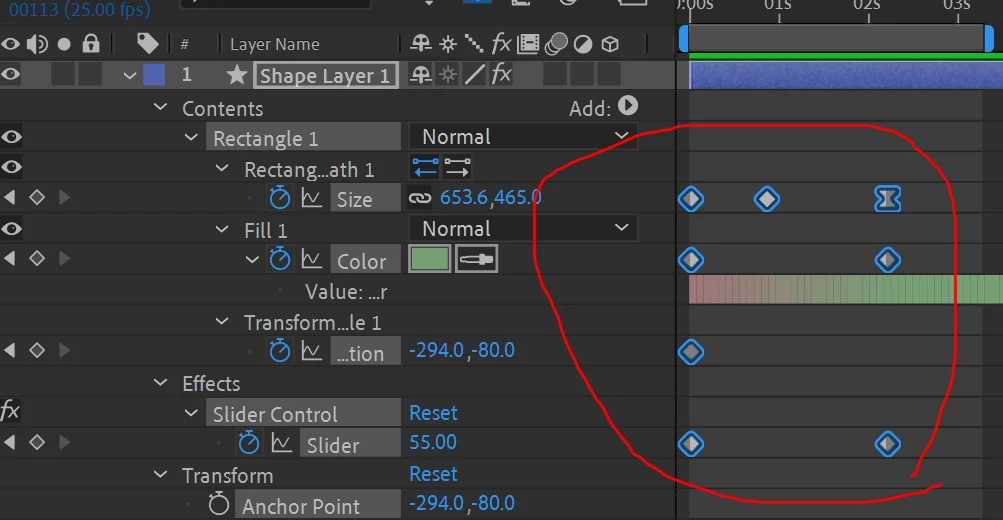
I wrote a script but it only works with Anchor Point, Position, Rotation,...
How to delete all keyframes of all properties of a layer?
Can someone give me an example, thank you very much

    var activeComp = app.project.activeItem;
        var selectedLayer = activeComp.selectedLayers[0];
            for (var i = selectedLayer.property("Transform").numProperties; i >= 1; i--) {
                var prop = selectedLayer.property("Transform").property(i);
                for (var j = prop.numKeys; j > 0; j--) {
                    prop.removeKey(j);
                }
            }

This topic has been closed for replies.
Correct answer Dan Ebberts

You need a recursive property sniffer. Try this:

function processProperty(theProp){
	if (theProp.propertyType == PropertyType.PROPERTY){
		for (var j = theProp.numKeys; j > 0; j--){
			theProp.removeKey(j);
		}
	}else{ // must be a group
		for (var i = 1; i <= theProp.numProperties; i++){
			processProperty(theProp.property(i));
		}
	}
}
var myLayer = app.project.activeItem.selectedLayers[0];
processProperty(myLayer);

1 reply

Dan Ebberts
Community Expert
Dan EbbertsCommunity ExpertCorrect answer
Community Expert
November 23, 2023

You need a recursive property sniffer. Try this:

function processProperty(theProp){
	if (theProp.propertyType == PropertyType.PROPERTY){
		for (var j = theProp.numKeys; j > 0; j--){
			theProp.removeKey(j);
		}
	}else{ // must be a group
		for (var i = 1; i <= theProp.numProperties; i++){
			processProperty(theProp.property(i));
		}
	}
}
var myLayer = app.project.activeItem.selectedLayers[0];
processProperty(myLayer);
The_Kitty
The_KittyAuthor
Inspiring
November 23, 2023

thank you