
Inspiring
July 14, 2023
Answered

How to remove text effects?

  • July 14, 2023
  • 1 reply
  • 1710 views

When I add an effect, such as 'Typewriter' but then I decide I want to remove the effect... is it best to just turn off the keyframe when the text is all visible?


If I remove the 'Range selector' property the text all seems to disappear?
This topic has been closed for replies.
Correct answer Ishan Y

Hey,

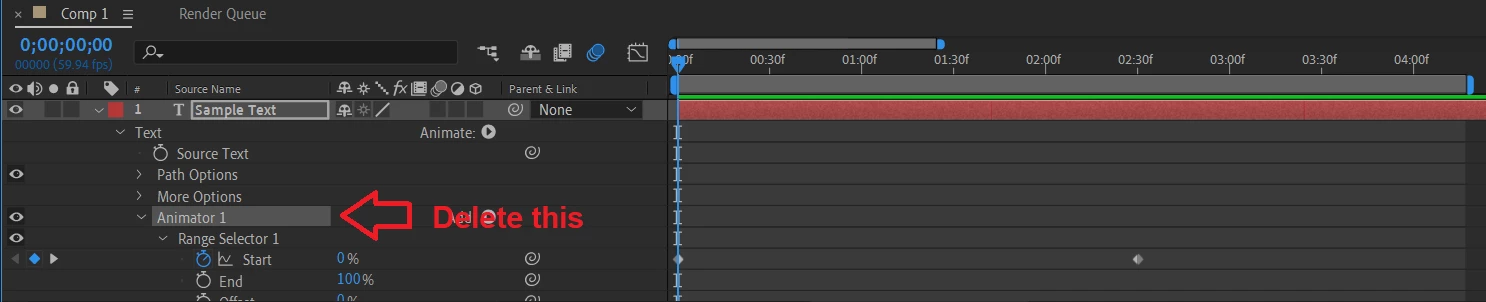
Since Typewriter is an animation preset, it cannot be seen on the Effects Controls panel. So deleting it from the panel is not an option. Deleting the Animator in the layer controls should remove the preset. Are you experiencing any issues doing so? If you do not see the Animator, tap U to collapse the layer, and then double-tap U again to show all layer controls.


Thanks,

Ishan

1 reply

Ishan Y
Ishan YCorrect answer
Inspiring
July 14, 2023

Hey,

Since Typewriter is an animation preset, it cannot be seen on the Effects Controls panel. So deleting it from the panel is not an option. Deleting the Animator in the layer controls should remove the preset. Are you experiencing any issues doing so? If you do not see the Animator, tap U to collapse the layer, and then double-tap U again to show all layer controls.


Thanks,

Ishan