
Known Participant
March 29, 2023
Answered

How to resize switches/modes?

  • March 29, 2023
  • 1 reply
  • 396 views

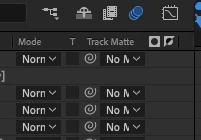
How do you resize the switches/modes area in After Effects?  They are all crunched together and you can only see 3-4 letters making it difficult to find certain layers.  I can resize the comments or layer name but there are no vertical lines to resize at the top, just the ability to move it. 
 

This topic has been closed for replies.
Correct answer Rick Gerard

If you hover over the intersection between two timeline columns at the top of the timeline, the mouse cursor will change to a double-ended arrow. When that appears, click and drag to expand the columns. The intersection is hard to see. It is in the row that says Layer Name/Mode/Track Matte in your screenshot, which is just above the first layer in the timeline. 

1 reply

Rick GerardCommunity ExpertCorrect answer
Community Expert
March 30, 2023

If you hover over the intersection between two timeline columns at the top of the timeline, the mouse cursor will change to a double-ended arrow. When that appears, click and drag to expand the columns. The intersection is hard to see. It is in the row that says Layer Name/Mode/Track Matte in your screenshot, which is just above the first layer in the timeline.