
Known Participant
July 30, 2021
Question

How to show/hide specific property? and some scripting questions.

  • July 30, 2021
  • 2 replies
  • 5042 views

1.What I met:

I can't show some properties by shortcuts or commands easily, such as Shape Layer - Contents - Shape index - Path.

I want to show / hide this property the way like I press P,S,R to show position, scale and rotation property, or at least, by commands in scripting. Is this able to be solved?

-

2.You might say that I could input "path" into the search bar, and it is great, but I wonder if there is any better way:
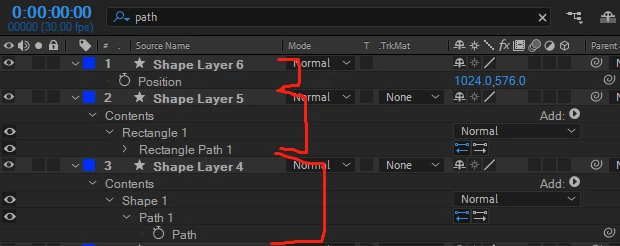
If I use search bar to show properties, it will return the whole properties hierarchy and you can see here, the Path property can consume even 5 rows of timeline space, while pressing P and U (if you have keyed Path property)turns out to be 2 rows. (It's killing me when there are more than10 shape layers, I gotta scroll very far)

-

3.Plus problem: 

Is there any scripting reference or API that can make selected property fold and unfold?

And I know I can access property by:

    app.project.activeItem.selectedLayers[0].selectedProperties

    app.project.activeItem.selectedLayers[0].property("name")

    app.project.activeItem.selectedLayers[0].property(index)

However by "name", sometimes property names might collide(ShapeLayer - Contents - Shape - Transfrm will collide with this.Transform, because their names are the same). Can I access properties by a fixed code? For an example, in Cinema 4D I can get every BaseObject Position value by Object[c4d.ID_BASEOBJECT_REL_POSITION], it's kinda like a builtin code.

This topic has been closed for replies.

2 replies

Meng Zhiqun
Inspiring
October 29, 2021

Just like P, S, R, U, you can actually press SS, S twice, to solo any selected properties.

Mathias Moehl
Community Expert
Community Expert
July 30, 2021

concerning the 3.Plus problem:

you need to apply the .property("...") function for all groups inside which the property is nested.


Here is an example:


This is the position of the layer:

layer("Shape Layer 1").property("Transform").property("Position")


This is the position property of the Transform group of Shape 1

layer("Shape Layer 1").property("Contents").property("Shape 1").property("Transform").property("Position")


Mathias Möhl - Developer of tools like BeatEdit and Automation Blocks for Premiere Pro and After Effects
LinxyviaAuthor
Known Participant
July 30, 2021

Appreciated it, Mathias Moehl! I think I understand this a little more! So all the hierarchy are actually Property type, and at the same time they contain the function of being a group, that's why it could be coded "property("")" all the way down?

Mathias Moehl
Community Expert
Community Expert
July 30, 2021

there are two different types of objects:

Property

PropertyGroup


Properties are just the leaves of the tree which have no children anymore, all inner elements are PropertyGroups.


Each PropertyGroup has a function .property() which returns a child in that group - and which in turn can be either a Property or a Property Group.


A layer is a property group, too, therefore, you can call
layer("Shape Layer 1").property("Transform")

Since the transform group itself contains children, it is a Property Group and hence, you can call property() on that group again:

layer("Shape Layer 1").property("Transform").property("Position")
The position in the transform group is no Property Group, it is a Property.


Mathias Möhl - Developer of tools like BeatEdit and Automation Blocks for Premiere Pro and After Effects