


How to Skip Last Layer in "For Each Layer" Block to Avoid Error? Automation Blocks
- 1 reply
- 405 views
- Translate
Hi everyone,
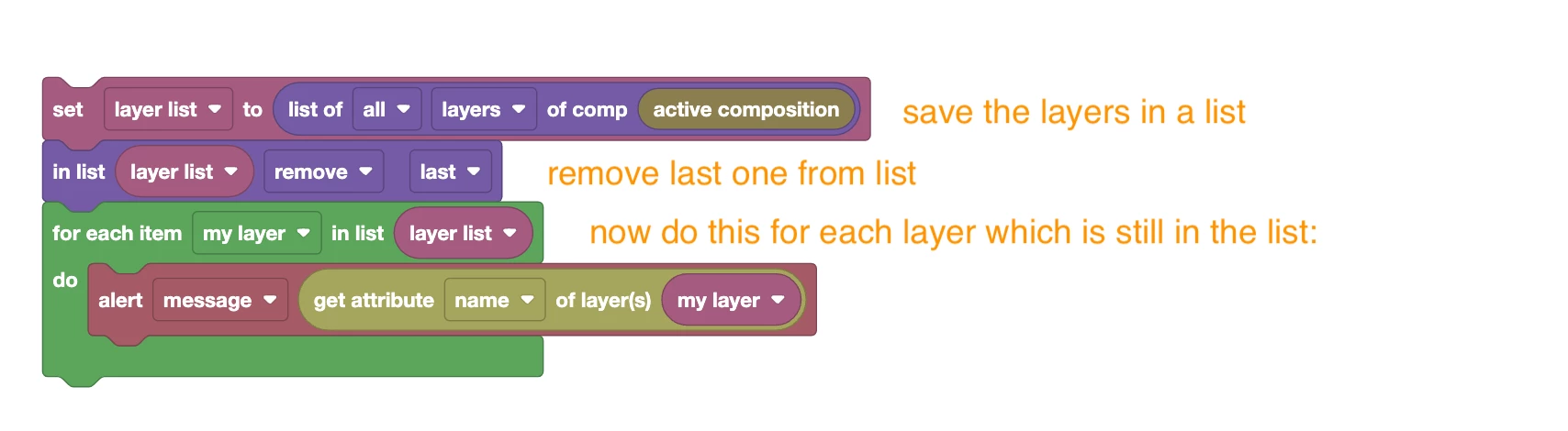
I'm using the "For Each Layer" block in my script. What I’m trying to do is:
Get the current layer's position.
Add +100 to the position.
Set this value to the next layer.
Everything works fine except for the last layer. For example, if I have 10 layers, all 10 positions are set correctly, but I get this error:
execution result: could not find object with path '11': layer 11 does not exist
Because the script tries to access layer 11, which doesn't exist, it throws an error and stops the script.
I tried using index-based logic to avoid the last layer, but variables don't seem to work properly inside the "For Each Layer" block.
Has anyone solved this issue? How can I skip the last layer in a "For Each Layer" loop to avoid this error?
Thanks in advance!

 AdChoices