Known Participant
December 28, 2024
Answered

How to track luminance like tracking motion?

  • December 28, 2024
  • 2 replies
  • 1288 views

I don't know what this kind of function or effect is called; How can I track the luminance or lightness of a certain selected area, in a way similar to how motion is tracked, and convert the level into keyframes to apply to an effect on another layer? 


For example, if I have a layer with an explosion or a candle, I would like to track the luminance of a selected area, and then use that data to manipulate a variable like Exposure (but also other effects) on another layer. 

Correct answer Rick Gerard

The structure of the comp depends entirely on your shot and design. This would be a good subject for one of my tutorials. In the meantime, take a look at this comp using an Adobe Stock shot.
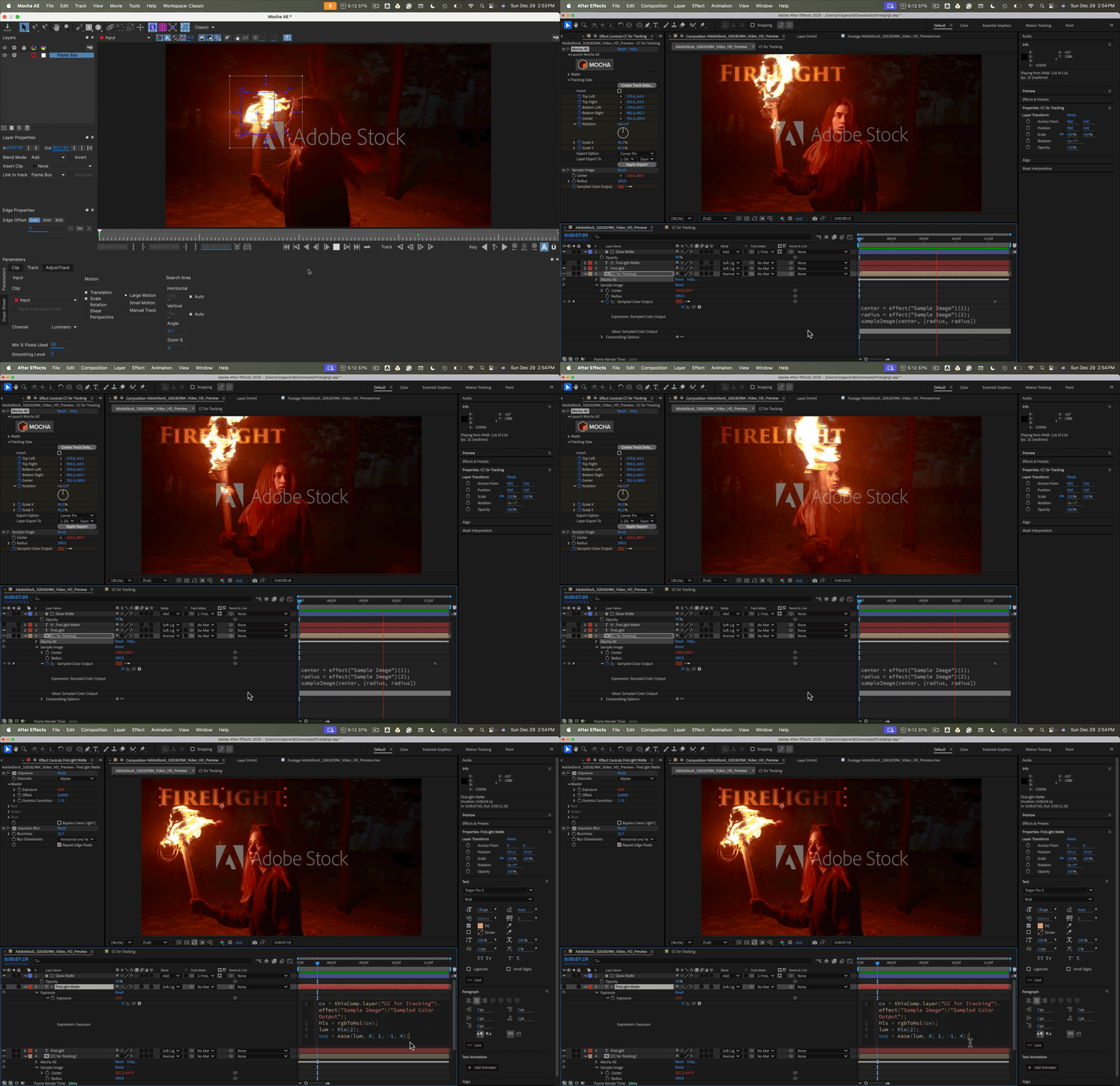
I used a shape layer with a blur plus a matte tied to the center of a Motion Track in Mocha as a track matte with the add blend mode. The color of the blurred and matted shape layer was controlled with a simple linear expression tied to the torch's average original color. I also controlled the exposure of the text layer and fiddled around a bit with some other settings to create this composite. 


The project is far from perfect, but the included project files (25 and 24) might give you some ideas. To polish it up, I probably would have done some rotoscoping, maybe made the text a 3D layer, and added a light controlled by the average luminance value of the torch track. If the light was a spotlight, I could also use the tracking data from Mocha AE to keep the light pointed at the text layer.


I will let you know if I produce a tutorial on this kind of workflow.

2 replies

Participant
January 3, 2025

You could extra luminance with a keyer, and track only that.  Say a torch or lightbulb, you could select it based on luminance, than have that as the only thing in the screen that tracks, essentially turining it into occultion mask. Later you copy and paste tracking data.  At least that is how I do it in other compositing apps. I would assume After Effects has the base level tools to do the same.

Participant
January 29, 2025

Please explain how to do this. I am looking to track a simple white object that is moving a lot on a black background. It has become a nightmare.

Community Expert
December 28, 2024

You could use Mocha AE (a much more powerful and accurate tracking tool than AE's object tracking) to motion track the bright object (the candle), then attach a Null to the center of that track. I can then link the track to the position of the null to move the center of the Presets/Image-Utilities/Sample Image Expression to get the color values near the candle's center. 


Once you have sampled that color, you can convert the Sample Imate/Sampled Color output to generate the luminance value of the tracked light. This code will give you a value between 0 and 1 for the luminance value of the sampled layer. ("Candle Video"):

cv = thisComp.layer("Candle Video").effect("Sample Image")("Sampled Color Output");
hls = rgbToHsl(cv);
lum = hls[2];

You can then use the Lum value to adjust the exposure value of Lumetri/Exposure or any other color correction effect by using some simple math or even an ease or linear interpolation method to control anything but the curve effect to automate the color adjustments to your layers.


If I saw your timeline with the modified properties of the layers you want to color grade, I could give you some specifics.


Another much simpler approach would be to create a black-and-white radial gradient shape layer with the center of the gradient on the anchor point, set the blend mode to overlay, adjust the size and opacity, and adjust the size, then attach the position of the tracked candle to the radial gradient. Experiment with blend modes and opacity to get the look you want.  I use blend modes, blurs, glows, and other simple effects to clean up my composites in almost all of that kind of project.

paul_7484Author
Known Participant
December 29, 2024

Thanks very much for your detailed instructions. It's more complicated than I expected, considering that it seems like a common effect for one element to "throw light" on another element. I will give this a try. The expression above goes where, now? In the SampleImage effect, or in the target Exposure effect? 

Rick GerardCommunity ExpertCorrect answer
Community Expert
December 29, 2024

The structure of the comp depends entirely on your shot and design. This would be a good subject for one of my tutorials. In the meantime, take a look at this comp using an Adobe Stock shot.

I used a shape layer with a blur plus a matte tied to the center of a Motion Track in Mocha as a track matte with the add blend mode. The color of the blurred and matted shape layer was controlled with a simple linear expression tied to the torch's average original color. I also controlled the exposure of the text layer and fiddled around a bit with some other settings to create this composite. 


The project is far from perfect, but the included project files (25 and 24) might give you some ideas. To polish it up, I probably would have done some rotoscoping, maybe made the text a 3D layer, and added a light controlled by the average luminance value of the torch track. If the light was a spotlight, I could also use the tracking data from Mocha AE to keep the light pointed at the text layer.


I will let you know if I produce a tutorial on this kind of workflow.