


Participant
July 18, 2026
Question

I am facing a big problem in after effect. the values are not visible in the transformation properties. can anyone help me?

  • July 18, 2026
  • 2 replies
  • 27 views

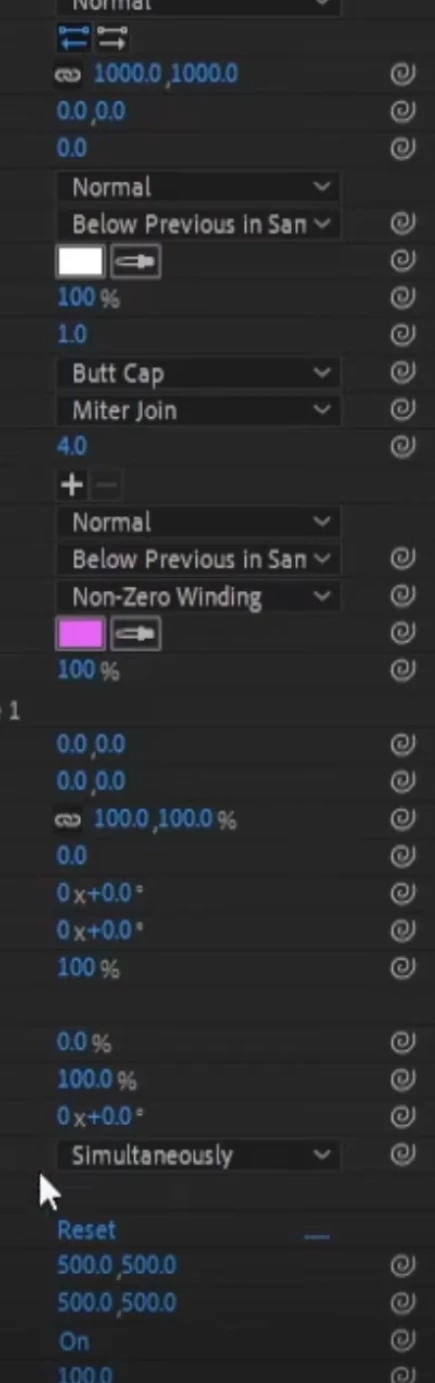
When i click “s” to open the scale property, the values of scales are not visible. that’s why i need to open properties panel to control its value which slow down my work. same happening with every properties. i mean the values are visible at all. i am sharing two screenshots 1. the issue. 2. what’s missing 
 

    2 replies

    Nishu Kushwaha
    Community Manager
    Community Manager
    July 20, 2026

    Hi Bhakta, adding to Ufuk's suggestion, could you check the bottom-left of your Timeline panel? There are a few small toggle buttons that show/hide columns. Try enabling all of them and see if the value fields come back.

    If that doesn't help, Ufuk's other suggestions are worth trying too:
    - Test in a brand new project.
    - Toggle off Preferences > Appearance > "Hardware Accelerate Composition, Layer, and Footage Panels" and restart AE.

    Let us know what you find.

    M. Ufuk Korkusuz
    Participating Frequently
    July 18, 2026

    Looking at your screenshots, I don’t think this is just a hidden column or a collapsed timeline. The property names are still there, but the value fields themselves seem to be missing, which isn’t normal.

    Did this start happening after an After Effects update, or did it appear out of nowhere? Also, have you tried creating a completely new project to see if the same thing happens there? If it does, I’d start looking at preferences or GPU/UI rendering rather than the project itself.

    Typography • Type Design • Illustrator Scripting • Open Source