
I can not darken a simple png file in a comp in After Effects.
4 days and counting. Seriously.
This problem is so weird, for you it might be simple, PLEASE HELP!
I cut out and darkened a chair in photoshop, made the png, and imported into AE comp timeline.
The chair looks like this in the timeline: nice and dark, the way I want it. (very dark scene)
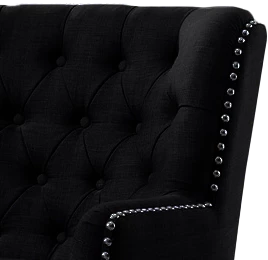
I export the comp out of After Effects, using ProRes , then import that into PPro. Looks great also in PPro, a dark scene with a dark chair. No problem.
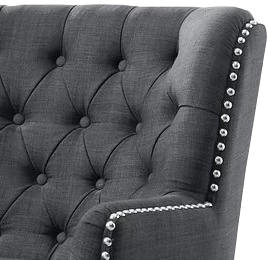
Burn it to disc, play it on the HDTV, and the scene looks great, EXCEPT:
The chair in the scene now looks like this:
I have tried multipe tests for days:
1) lower opacity
2) darken
3) change the AE project bit (currently 16bit) , tried 32. photo is 32 bit, I even changed it to 8 bit, same results.
4) lowered the black levels
5) lowered the exposure
6) deleted, reinstall. wash, rinse, repeat....
7) ran it with and without color management!
It's always bright! is it possessed?
Doesn't even darken a bit, it's always the same. It's laughing at me!!
Monitor is calibrated at rec709 gamma 2.4
Standard Video 8bit (old school) latest AE, PPro, AME GTX1050ti gpu 32gb Ryzen 7. Solid computer set up, working fine.
I doubt it's a gamma issue because the scene looks fine on tv, just this png is bright.
Here is the kicker:
When I export an mpg2 from ppro and watch it on the monitor, it looks fine....chair is dark.
But for some Twilight Zone reason, only on the tv, the chair is bright and the rest of the scene is dark.
I am at my wit's end.
Please send me your advice,
Thanks very much!!
Letty
 AdChoices