Participant
April 15, 2022
Answered

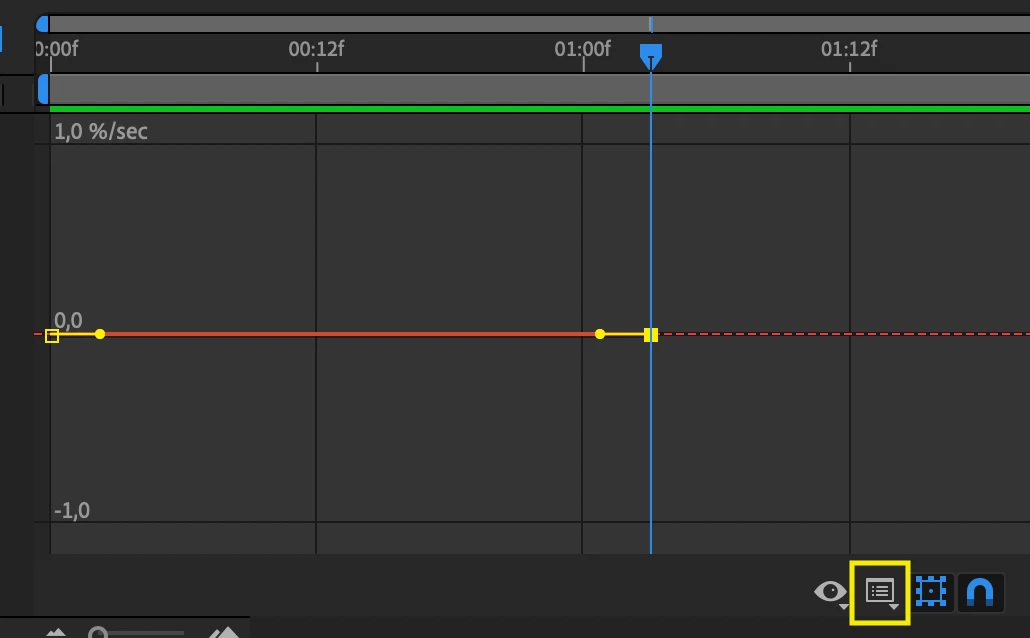
I can't move the yellow handle diagonally.

  • April 15, 2022
  • 2 replies
  • 2432 views

so I just started using After Effects like last week and I thought it was fine because the layout that I'm seeing is the same as the layout of the AE of many youtubers but when I tried to use the graphs, i tried to move the yellow thing, it only move horizontally, i can't move it diagonally. please help me fix this.

This topic has been closed for replies.
Correct answer Jose Panadero

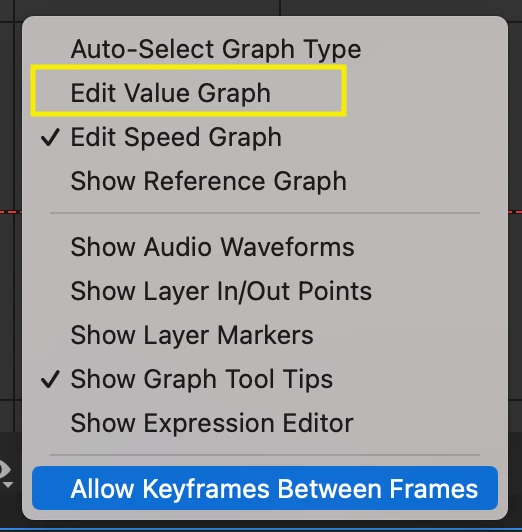
You are using the speed graph so you can not move the handles diagonally. You must change the curve to Value graph. Check attached images (yellow rectangles).


2 replies

Jose Panadero
Community Expert
Jose PanaderoCommunity ExpertCorrect answer
Community Expert
April 16, 2022

You are using the speed graph so you can not move the handles diagonally. You must change the curve to Value graph. Check attached images (yellow rectangles).


Participant
February 11, 2024

ive had a problem where im unable to even see the knobs in value graph, im not sure why?

Participant
February 11, 2024

forgot to send image

ShiveringCactus
Community Expert
Community Expert
April 16, 2022

After Effect's speed graphs don't give you a huge amount of control, I'm afraid.  When you say "yellow box", is possible you have the white square selected instead?  That's the time setting for the keyframe (I think) whereas the yellow square can move the keyframe in time and value.