


Participant
September 29, 2023
Question

I cant start cineware nor does AE find a valid install of C4D

  • September 29, 2023
  • 1 reply
  • 464 views

Hi, 

im new to after effects and tried to practice a little bit of 3d animation. But somehow I cant use the cineware effect because it crashes with error code 0 9995.
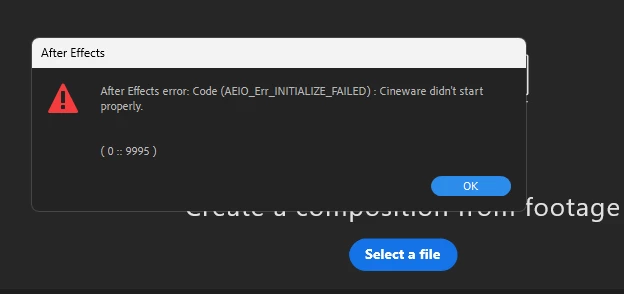
 

If I try to create a new C4D File it shows me this message:
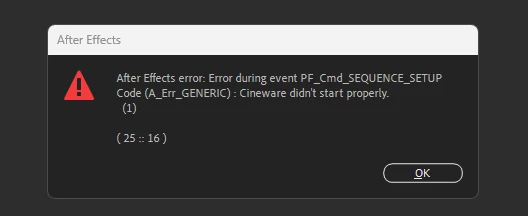
I reinstalled AE multiple times, I reinstalled C4D multiple times, tried different versions, but nothing is working. Im really questioning wether its worth the 60 Dollar monthly subscription 😞

My Rig is:

Windows 11

RX 6500XT

Ryzen 7 5700X

32GB RAM

2TB SSD Memory


Thanks!

This topic has been closed for replies.

1 reply

nishu_kush
Community Manager
Community Manager
September 29, 2023

Hi SaltySWS,


That's not ideal. Sorry about that.

Did you install Cinema 4D externally? Which version did you try? If possible, can you uninstall the Cinema 4D external installation and install the one that comes with After Effects? Here's how: https://helpx.adobe.com/in/after-effects/using/c4d.html

Also, try running After Effects as Administrator (right-click the After Effects icon and select Run as administrator).

Let us know the outcome.


Thanks,

Nishu

AISaltyAuthor
Participant
September 30, 2023

I uninstalled Cinema4D and maxon, but Creative Cloud does not recognise that i uninstalled it. When I open AfterEffects it tells me that I have to install C4D, as it should. I restarted my PC and Creative Cloud, but its not working.


nishu_kush
Community Manager
Community Manager
October 6, 2023

Sorry for the delay in response, SaltySWS.

If that's the case, please uninstall After Effects as well. Creative Cloud should be able to register that After Effects has been removed and Cinema 4D with that. Once done, install After Effects again and choose to install Cinema 4D when prompted.

Let us know the results.


Thanks,

Nishu