Participant
October 7, 2021
Question

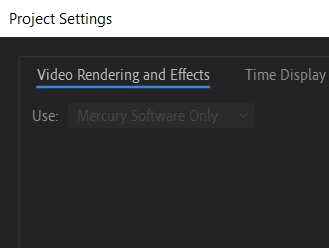
I cant switch back to my GPU

  • October 7, 2021
  • 6 replies
  • 856 views

I recently turned off my GPU to export a project because i was having export issues, but after using trapcode in my new project, i can't seem to turn my GPU back on, any fixes will be helpful.
This topic has been closed for replies.

6 replies

Participant
October 10, 2021

I have a problem, my problem is that i switched to CPU - (Mercury Software Only) because i was facing some render problems, later that day i installed the Trapcode Particular plugin and now i cant seem to switch back to "Mercury GPU Acceleration" .


Some things i tried are - Restarting my After Effects and my laptop, un-installing the Trapcode particular plugin, and trying to switch to mercury GPU acceleration in other projects, to identify if the issue is only in that one project or in all projects, and i cant switch to my GPU in any project.


My system specifications are - AMD Ryzen 5 3500U processor, Radeon Vega 8 Graphics, 8 GB RAM and running on Windows 10.


I am using After Effects 21, i will attach a screen shot of what i mean by "i cannot switch back to mercury GPU acceleration" Any kind of help or suggestion would be appreciated, thank you.

nishu_kush
Legend
October 12, 2021

Merging the duplicate post with the original one.


Thanks,

Nishu

Mo Moolla
Legend
October 8, 2021

If you are on AE Beat switch off multi core rendering as the older versions of Particular dont use this.

The newer versions do.

So as a fist step install the latest version of Particular.


If this fails you can try this:

Uninstall Particular with Maxon's Uninstaller 

Restart AE and start a new comp with a few basic keyframes

Switch back to GPU rendering


Reinstall the latest version of Particular


I have seen this before where the Particular "flag" default was reading incorreclty 


This fixed it on a Mac (should work on a PC)


Mo

Participant
October 8, 2021

Hi Mo,

i uninstalled the Red Giant Trapcode Suite and restarted AE, added simple keyframes just as you said in a new comp, but when i head over to my project settings im still unable to switch back to "Mercury GPU Acceleration". I am running After Effects 21, on Windows 10, 8GB RAM, with a AMD Ryzen 5 3500U processor and a Radeon Vega 8 Graphics card for anyone asking. and yes i have tried all possible and easy fixed like restarting after effects or my device as well. This issue is not only happening in one project but on all of my projects. Any more suggestions would be highly appreciated.


Zeeshan

nishu_kush
Legend
October 12, 2021

Hi Zeeshan5FA7,


Would you mind sharing the make and model of the GPU and version of its driver that's installed?

Let us know.


Thanks,

Nishu

OussK
Community Expert
Community Expert
October 8, 2021

Did you try any solution, like restart AE or restart your PC? 

ToolfarmJP
Community Expert
Community Expert
October 8, 2021

You also check the updater of Trapcode.


https://www.redgiant.com/support/installers/updates/

nishu_kush
Legend
October 8, 2021

Hi Zeeshan,


Sorry for your issue.

As Mylenium mentioned, your system specs (CPU, GPU, RAM, OS) would help us to troubleshoot the issue properly. Also, what's the version of After Effects you're using: https://community.adobe.com/t5/after-effects-discussions/faq-how-to-find-the-exact-version-of-after-effects-you-re-using/td-p/9972137 

Let us know.


Thanks,

Nishu

Mylenium
Legend
October 7, 2021

We honestly can't know. You have not offered any system information or other details, most critically of course being your GPU info and whether or not it actualyl worked/ works on some level. That said, of course using heavily GPU-accelerated plug-ins like MIR could simply exhaust all hardware resources and prevent AE's own GPU usage from ever doing anything meaningful or even not being available, so the first thing to check is whether this works in a project not using this stuff. That and of course the usual steps liek updating graphics drivers and possibly trashing the prefs.


Mylenium