


Answered
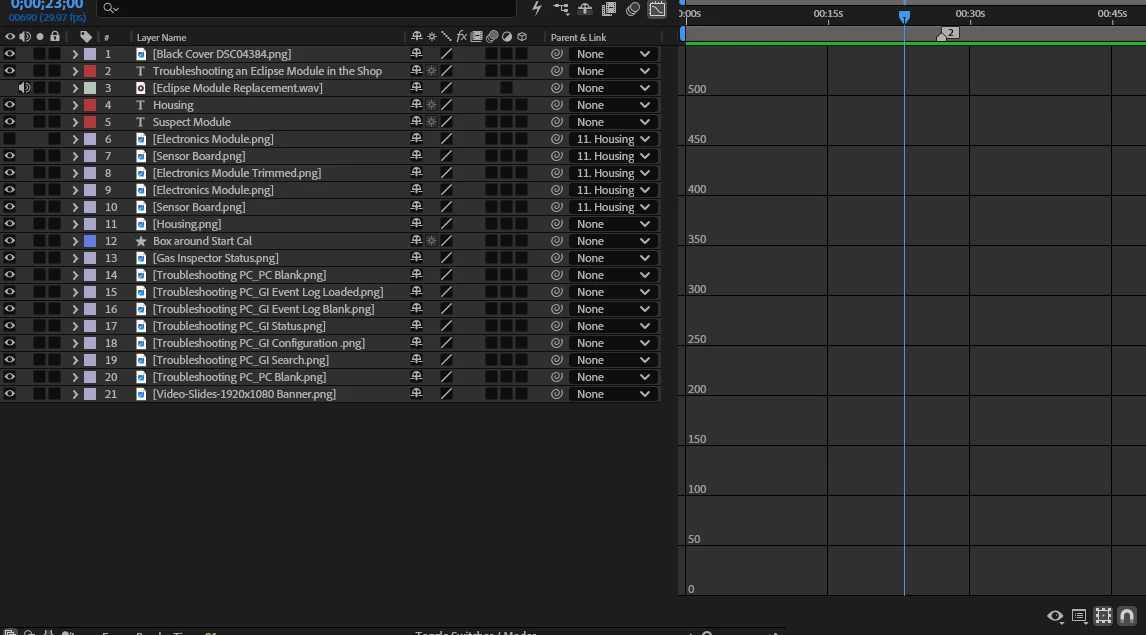
I have one composition's timeline that I don't understand the format, how it got there, nor how to fix it. There are not bars. It has numbers down the left side. The preview works. I just can't see bars.
I have been working with After Effects for six years and haven’t seen this before. This project has six compositions. The timeline on five of them work as normal, all the collateral is listed on the left and there are horizontal bars for all them in the timeline. I can sweep through and view the composition.
One of the compositions has all the collateral listed on the left side. The timeline is showing time but there are no horizontal bars showing when a piece of collateral appears/disappears. There are numbers listed down the side. You can sweep through the timeline and watch the preview but there are no bars or graphics in the timeline. How did this happen and how can I get it back to normal view?

 AdChoices