

GM Rod
Known Participant
May 23, 2022
Question

I'm getting absolutely ridiculous render/preview times. What to do?

  • May 23, 2022
  • 2 replies
  • 966 views

Hey guys!
So, I've been trying to craft these sound react videos of about a song's length (3 to 4:30 minutes on average).

The PC I'm doing it on is pretty much at its max possible configuration.
AMD 3950X 16-core
128gb of 3200MHz RAM
NVidia RTX 3090 GPU
Everything is running on Gen4 SSDs (both the OS and the cache drive. Project is also on the SSD, and so are all the files in it).
However, I'm getting over 10 HOUR render times for these videos.
They don't have anything crazy... just a couple layers with Sound Keys, and about 4-5 of the layers are 3D and have sound-based transforms like scale, rotate etc.
There's a little bit of Twitch (the plugin), and some blur...
I was doing this on my Mac Pro 5-6 years ago and it took this long. But that was a much weaker machine (12-core, DDR3 RAM, much lesser GPU, it was the trashcan mac).
I find it hard to believe that in half a decade, nothing has improved here.
I MUST be doing something wrong.

I'll attach my export settings as well.
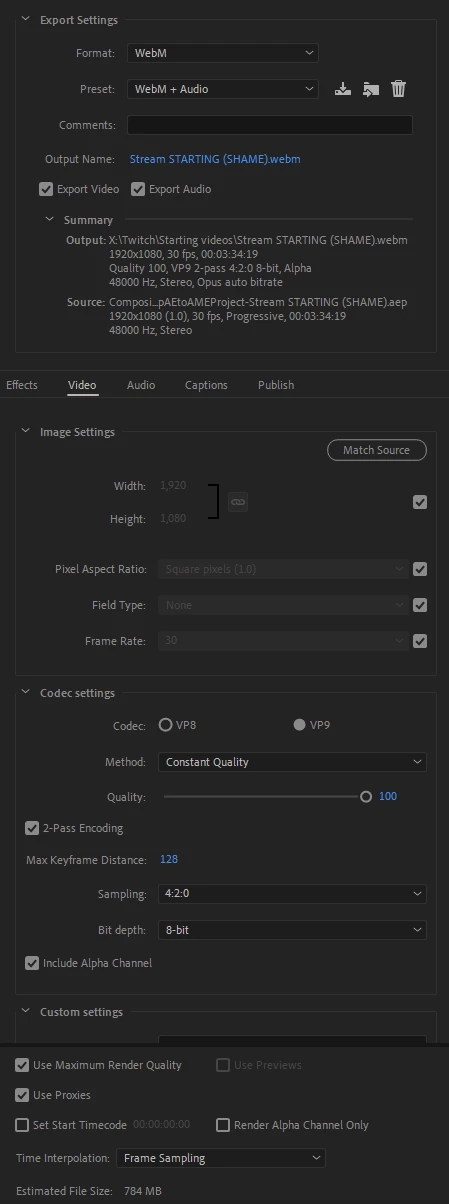
The purpose of this, is for my livestream. WebM is light so OBS has no issues opening it, and I need alpha because I need to show other stuff behind it.
Maybe a different codec would help me here?

This topic has been closed for replies.

2 replies

Szalam
Community Expert
Community Expert
May 24, 2022

If you're using a relatively recent version of After Effects, there's a very handy render time column you can enable in your timeline panel. It can show you the exact amount of time each layer takes to render. You can twirl a layer open to see how long each effect or expression on the layer takes to calculate as well. VERY handy for diagnosing slowdowns.

GM Rod
GM RodAuthor
Known Participant
May 25, 2022

Yeah that column makes me cry... It's red all the time 😞

Jose Panadero
Community Expert
Community Expert
May 23, 2022

We assume that you are sending the composition via Adobe Media Encoder. What I would try is to export in a high quality format within After Effects and then using Media Encoder to create the final format. Anyway having 3D layers can increment render times exponentially even if thei are not complex graphics. And of course effects like Twitch have been not updated a long time ago and it wouldn't benefit for hardware upgrades.

GM Rod
GM RodAuthor
Known Participant
May 23, 2022

Yes, I'm using Media Encoder.

So you're saying I'm basically screwed, then?
If only it was just the long renders. It's also finding out something glitched and having to do it again.
Because previewing is just as painful so I can't even see what's happening before I export...

Jose Panadero
Community Expert
Community Expert
May 23, 2022

It would be great if you could share some screenshots of your Timeline and composition panels, and your composition settings too. If you are usign the Cinema 4D renderer, render times are also slower.