Participant
June 2, 2021
Answered

I need help getting my text box bigger

  • June 2, 2021
  • 2 replies
  • 577 views

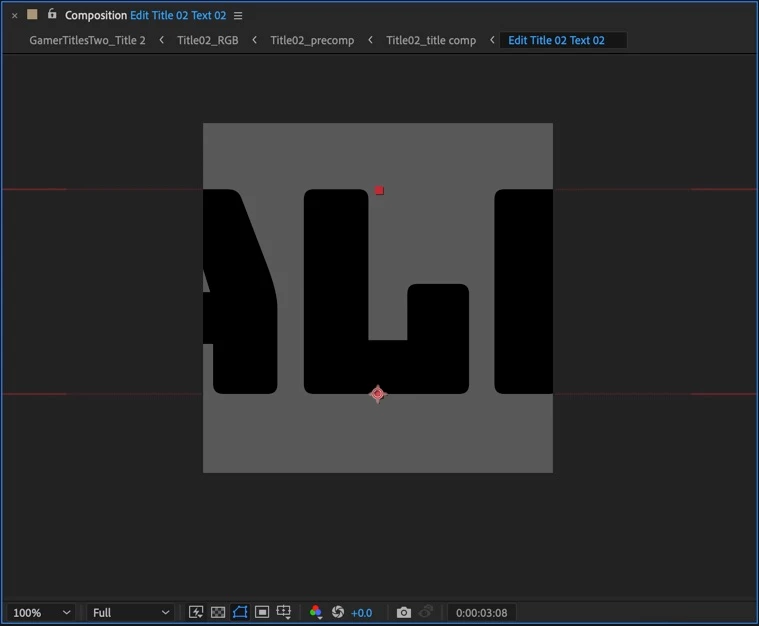
I am very new to ae and I’m creating a mogrt but my text gets cut off because of the this square. Is it possible to make the square bigger without having to change the size of the font?

This topic has been closed for replies.
Correct answer Warren Heaton

I think you're looking to increase your Composition Frame Size.  Try pressing command k (mac) or control k (Windows) to bring up the Composition Settings and increase the Composition Width.


To determine the current Scale of your text in pixels, select the Text Layer and choose Layer > Transform > Scale.  In the Scale dialog box, change the Units pop-up menu from "% of Source" to "Pixels".  Knowing the width and height of your text in pixels will help you to set a Comp Frame Size that does not cut it off.


For what it's worth, it's common to design MOGRTs at a standard frame size like 3840-by-2160 or 1920-by-1080.


It may also be mentioning some terminology:

  • Comp Size/Frame Size = The width and height of the visible area of the Composition in pixels.
  • Point Text/Point Type = A Text Layer where the characters originate from a point that is aligned to the left, center, or right of the baseline.  This is the default when creating a Text Layer.
  • Box Text/Area Text = A Text Layer where the characters are constrained to a box drawn with the Type Tool by clicking and dragging in the Composition panel and the text is aligned to the left, center, or right of the resulting box.

2 replies

Community Expert
June 3, 2021

It is time for you to spend some time with the User Guide. You might want to also take a look at the Learn workspace available in the Window menu or on the Start Screen for AE. Instead of just jumping right into following some tutorial you found or experimenting with AE make sure you understand the UI and the basic workflows. After Effects is a lot more complicated than any NLE and if you don't take some time getting proper training from folks that really know what they are talking about, you may crash and burn. Just knowing the basics may help you land but if your approach gets into trouble you will be a lot better off if you spend some time in school.

Warren Heaton
Community Expert
Warren HeatonCommunity ExpertCorrect answer
Community Expert
June 2, 2021

I think you're looking to increase your Composition Frame Size.  Try pressing command k (mac) or control k (Windows) to bring up the Composition Settings and increase the Composition Width.


To determine the current Scale of your text in pixels, select the Text Layer and choose Layer > Transform > Scale.  In the Scale dialog box, change the Units pop-up menu from "% of Source" to "Pixels".  Knowing the width and height of your text in pixels will help you to set a Comp Frame Size that does not cut it off.


For what it's worth, it's common to design MOGRTs at a standard frame size like 3840-by-2160 or 1920-by-1080.


It may also be mentioning some terminology:

  • Comp Size/Frame Size = The width and height of the visible area of the Composition in pixels.
  • Point Text/Point Type = A Text Layer where the characters originate from a point that is aligned to the left, center, or right of the baseline.  This is the default when creating a Text Layer.
  • Box Text/Area Text = A Text Layer where the characters are constrained to a box drawn with the Type Tool by clicking and dragging in the Composition panel and the text is aligned to the left, center, or right of the resulting box.
Participant
June 2, 2021

YES that's it!! thank you!!

Warren Heaton
Community Expert
Community Expert
June 2, 2021

Could I trouble you to click the "Correct Answer" button under the post?  Thank you.