

S_ A
Inspiring
June 6, 2025
Answered

I need some guidance- naming layers

  • June 6, 2025
  • 1 reply
  • 277 views

Hi,


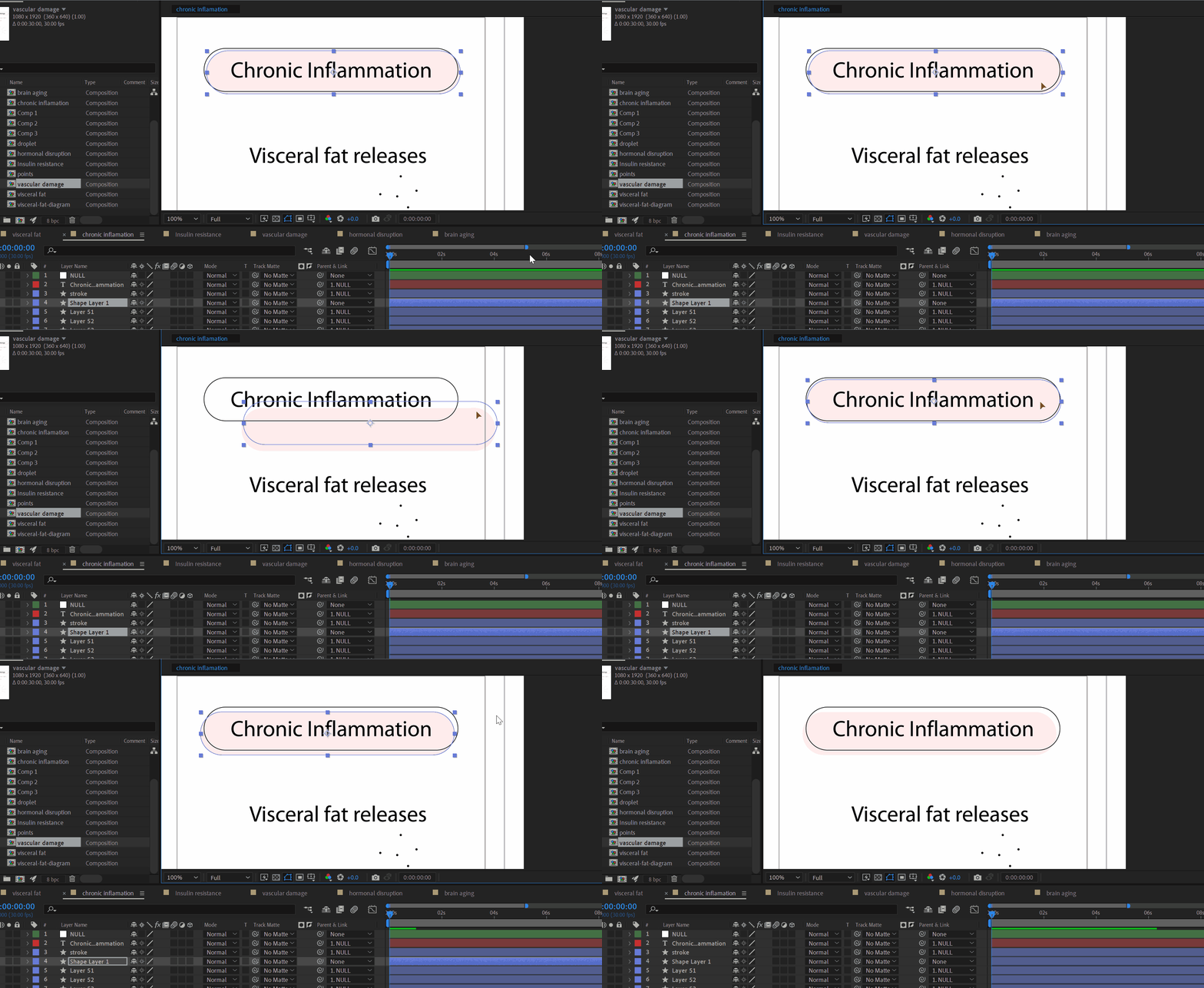
I need some guidance from seniors here. I alwys struggle with naming  layers. And we all know how much it is important to name your layer. But i do not know what I should call these types of layes in my animation. please guide me. When you have lots of shape layers in Infographic animation, that act as design material  for  popping up, disappears how should I name these? THESE ARE MANY!  any strategy I can borrow from you Elders!? Please please help me out. The example I attached, should I name it 'chronic inflamation bg shape' ?? such a big name!! often I need to find shapes to reanimate.. what is the proper way to name these kinds of layers in animation... I am after some honed knowledge. 


sometimes I stare at all these layers and feel like  'enough with AE, lets quit city life and start living in a forest'..  Please guide me.
Correct answer Kevin J. Monahan Jr.

Hi,

Naming layers in After Effects can indeed be challenging, especially when dealing with numerous shape layers in complex animations. Here are some strategies to help you streamline the process:

1. Use Descriptive but Concise Names

  • Avoid overly long names like "chronic inflammation bg shape." Instead, aim for something shorter yet descriptive, such as "InflamBG" or "InflamShape."
  • Use abbreviations where possible, but ensure they are clear and understandable.

2. Implement a Naming Convention

  • Prefix: Use a prefix to indicate the type of layer (e.g., "BG" for background, "TXT" for text, "SH" for shape).
  • Function: Include the function or action (e.g., "PopUp," "FadeOut").
  • Identifier: Add a unique identifier or number if there are multiple similar layers (e.g., "BGPopUp01").

3. Group Layers

  • Pre-compose related layers to reduce clutter in your main composition.
  • Color-code layers to visually differentiate them.

4. Regular Maintenance

  • Review and rename layers periodically to ensure names remain relevant and clear as your project evolves.

Example Naming Convention

  • BGPopUp01: Background shape that pops up.
  • TXTFadeOut02: Text layer that fades out.
  • SHInflam03: Shape layer related to inflammation.

Practical Tips

  • Consistency is key. Stick to your naming convention throughout the project.
  • Simplicity: Keep names as simple as possible while still being descriptive.


By adopting these strategies, you can make your workflow more efficient and your project easier to manage. Do you have any specific types of layers or animations you're struggling with? I'd be happy to help further!


Thanks,
Kevin

1 reply

Kevin J. Monahan Jr.
Community Manager
Kevin J. Monahan Jr.Community ManagerCorrect answer
Community Manager
June 6, 2025

Hi,

Naming layers in After Effects can indeed be challenging, especially when dealing with numerous shape layers in complex animations. Here are some strategies to help you streamline the process:

1. Use Descriptive but Concise Names

  • Avoid overly long names like "chronic inflammation bg shape." Instead, aim for something shorter yet descriptive, such as "InflamBG" or "InflamShape."
  • Use abbreviations where possible, but ensure they are clear and understandable.

2. Implement a Naming Convention

  • Prefix: Use a prefix to indicate the type of layer (e.g., "BG" for background, "TXT" for text, "SH" for shape).
  • Function: Include the function or action (e.g., "PopUp," "FadeOut").
  • Identifier: Add a unique identifier or number if there are multiple similar layers (e.g., "BGPopUp01").

3. Group Layers

  • Pre-compose related layers to reduce clutter in your main composition.
  • Color-code layers to visually differentiate them.

4. Regular Maintenance

  • Review and rename layers periodically to ensure names remain relevant and clear as your project evolves.

Example Naming Convention

  • BGPopUp01: Background shape that pops up.
  • TXTFadeOut02: Text layer that fades out.
  • SHInflam03: Shape layer related to inflammation.

Practical Tips

  • Consistency is key. Stick to your naming convention throughout the project.
  • Simplicity: Keep names as simple as possible while still being descriptive.


By adopting these strategies, you can make your workflow more efficient and your project easier to manage. Do you have any specific types of layers or animations you're struggling with? I'd be happy to help further!


Thanks,
Kevin

Kevin Monahan - Sr. Community and Engagement Strategist – Adobe Pro Video and Audio
S_ A
S_ AAuthor
Inspiring
June 7, 2025

😯😯😇Thank you so so much. I am gonna follow all those. I feel happy now. I was struggling with that for so long...