

Tardiv_
Participant
May 7, 2026
Question

I try to open AE but 2 things happen: 1. GPUSniffer.exe brings up an error. 2. When renaming GPUSniffer.exe so it bypasses it, the startup screen gets stuck on "initializing MediaCore"

  • May 7, 2026
  • 4 replies
  • 142 views

I try to open AE but 2 things happen:

1. GPUSniffer.exe brings up an error.

2. When renaming GPUSniffer.exe so it bypasses it, the startup screen gets stuck on "initializing MediaCore"


Here is a screenshot of what my Task Manager shows:
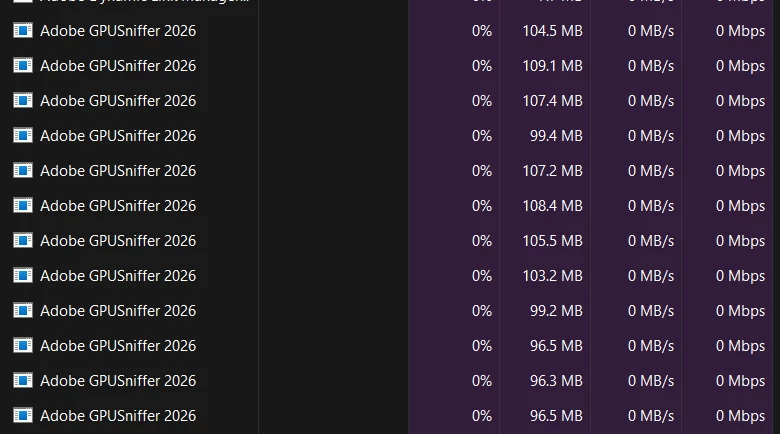
8 instances of GPUSniffer.exe open

PC Specs:

CPU: AMD 7950X3D
GPU: AMD RX 9070 XT 

I have tried everything possible. I searched the forums and even used Claude for troubleshooting but nothing works.

EXTRA INFO: If it makes any difference, this started while I had AE open and went away from the PC, and it entered sleep mode (not total sleep, just the screens and lights turning off)

    4 replies

    Nishu Kushwaha
    Community Manager
    Community Manager
    May 14, 2026

    Moving this thread from Bugs to Questions.


    Thanks,

    Nishu

    Nishu Kushwaha
    Community Manager
    Community Manager
    May 12, 2026

    Hi all,


    I reached out to the product team to get this issue investigated. They suggested that the issue is limited to the following combination of drivers:

    • 32.0.31007.1017 (AMD 90 series) 

    • 32.0.21043.7012 (AMD integrated)

    In this case, checking for the GPU driver update and installing it should help. If there’s no update available, try downgrading your GPU driver.

    Let me know how it goes.


    Thanks,

    Nishu

    Gaspard!@#ASD
    Participant
    May 12, 2026

    Hi,


    Thank you! 

    That worked for me in After Effects. But Premiere Pro still runs slow. 

    I downgraded my driver to version 32.0.23027.2005.


    Nishu Kushwaha
    Community Manager
    Community Manager
    May 12, 2026

    That’s great! Thanks for confirming. Let me know if there are any other questions.

    For the Premiere Pro issue, please create a post here.


    Thanks,

    Nishu

    Annis_Ryun
    Participant
    May 10, 2026

    Exact same problem here. Nothing will work and also have RX 9070 XT as GPU.

    Gaspard!@#ASD
    Participant
    May 8, 2026

    I need help !

    I’m experiencing the same issues and have already tried everything I could think of: updating my drivers, reinstalling After Effects and Premiere twice, renaming and deleting GPUSniffer.exe, updating Windows, and removing all my plugins.

    The strange thing is that both After Effects and Premiere were working perfectly fine before suddenly crashing. Since then, I haven’t been able to fix the problem. I can no longer open After Effects at all, and while Premiere does launch, it crashes after about two or three minutes.

    If this helps the developers identify the issue, the crash started while I was using Dynamic Link between After Effects and Premiere for sound design work.

    My computer specs are:

    • RAM: 32 GB CL30 6000 MHz

    • Processor: AMD Ryzen 7 9700X

    • Graphics Card: AMD RX 9070 XT Quicksilver

    • Motherboard: ASUS TUF Gaming B850-Plus WiFi

    Any help would be greatly appreciated.


    Extra info : I forgot to mention I am using the latest versions of both After Effects (26.2.1) and Premiere Pro(26.2.2).

    luhshmuky
    Participant
    May 9, 2026

    Same issue here,
    I have a RX 9060 XT, and we all experiencing this bug at the same time so I guess its some problem with the new Drivers. I have been trying things for the last 6 hours but nothing works.

    We just have to wait and hope someone is going to fix this soon.