
Participant
October 11, 2021
Answered

Illustrator layers import bug

  • October 11, 2021
  • 1 reply
  • 387 views

Hello, i hope that all of you are fine 🙂


Today, i had to animate a logo for my job, and i got a problem while i imported my Illustrator file in After Effects. 

Indeed, i imported it as a composition, i kept my layers size etc..

Everything seems nice for the moment, but something wrong happened now.


After Effects recognize my illustrator layers as photoshop layers... 


Here a two screenshots to explain you what i mean :
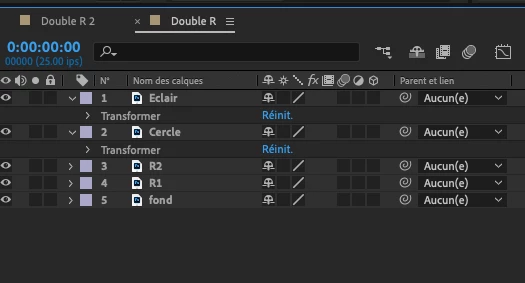
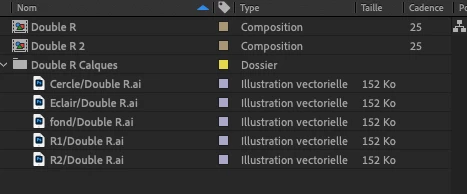
I hope that you'll understand my problem.

Sorry for my english that is not perfect, but I really hope that one of you got the same thing and could help me... 


Thanks you all for reading !
This topic has been closed for replies.
Correct answer Jose Panadero

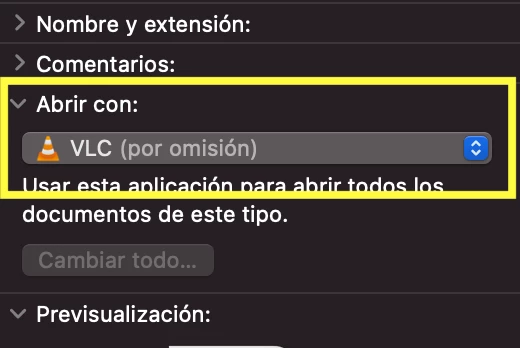
They are vector files. The only problem is that AE have associated this "image" thumbnail to your Illustrator files. What you can do is to locate your AI file in the Finder (assuming you are on macOS) and press COMMAND+I. This will open the Info window. Theres is a category where you can "force" the Finder to open AI files with Adobe Illustrator. Probably, it is associated to Apple Preview. Change to open them always in Illustrator and open again your AE project file to check if it appears correctly.


1 reply

Jose Panadero
Community Expert
Jose PanaderoCommunity ExpertCorrect answer
Community Expert
October 11, 2021

They are vector files. The only problem is that AE have associated this "image" thumbnail to your Illustrator files. What you can do is to locate your AI file in the Finder (assuming you are on macOS) and press COMMAND+I. This will open the Info window. Theres is a category where you can "force" the Finder to open AI files with Adobe Illustrator. Probably, it is associated to Apple Preview. Change to open them always in Illustrator and open again your AE project file to check if it appears correctly.


Participant
October 11, 2021

Thanks you for your answer,

Here was the problem, thanks you so much ! 


Have a nice day, and thanks you again 😄