
Aleksei_Segodin
Inspiring
February 12, 2018
Question

Image buffers exceed internal limits.

  • February 12, 2018
  • 5 replies
  • 5458 views

Hello, I have a problem which looks like this:
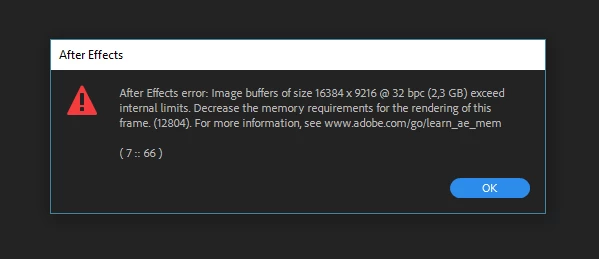
I'm using After Effects CC 15.01

RAM: 64GB

OS: Windows 10, x64

This error appears when I try to import 16384 x 9216 px OpenEXR file to the project.

After this warning window appears AE just crash.

Can you please, help to fix this issue? I really need that big file in my project.

P.S. This supposed to be a VR-ready application, so, I think there should not be a problem working with 16K footage.

This topic has been closed for replies.

5 replies

Inspiring
June 16, 2021

AE has some hard-coded memory limits. Dropping to 8- or 16-bit will reduce your memory footprint. Also try the latest beta which may have increased the limits. If not, file a feature request.

Participant
June 16, 2021

I'm having the same exact problem. But I had presaved the clips that I edited so now I can't control or see the effects that I used... What do I have to do? There's a key frame that freeze the rendering. I looked on YouTube and I found tutorials from people who used "EDIT >preference " to lower the height of the clip, but in AE 18.00 this "Preference" setting doesn't exist.. how can I render it ?

Participant
July 23, 2020

Hey yall I was just getting the same issue (screenshot) and what fixed it was turning on continuously rasterize on all the objects in the comp that wasn't letting me preview at full. Not sure if that will help yall. It was an AI file I was using a CC sphere effect on that was causing it. So keep continuous rasterize on when you use certain fx I guess.? Hope this helps someone!! 

Participant
August 7, 2018

Has this been taken care of?  I am having the same issue.  Seems like I'm capping out with EXR import on my machine around 12-14,000 pixels and getting the same message.  Then AE just quits.

Kevin J. Monahan Jr.
Legend
February 15, 2018

Hi Aleksei_Segodin, maybe you need even more RAM for such a frame? Have you figured this out yet? Let us know.

Thanks,
Kevin

Kevin Monahan - Sr. Community and Engagement Strategist – Adobe Pro Video and Audio
Aleksei_Segodin
Inspiring
February 15, 2018

Yes, I checked this.

When I import 12K footage it imports in the twinkling of an eye and after that I still have around 50 GB of free RAM.

Kevin J. Monahan Jr.
Legend
February 15, 2018

Hmm, that's a little strange, Aleksei_Segodin. Can you work with our support team via phone or chat? Here's how to get ahold of us: FAQ: How do I contact Adobe Support? Let us know what they say. If they can't help you, please PM me and I'll escalate your case.

Thanks,
Kevin

Kevin Monahan - Sr. Community and Engagement Strategist – Adobe Pro Video and Audio