
Leorbel
Participant
July 31, 2018
Question

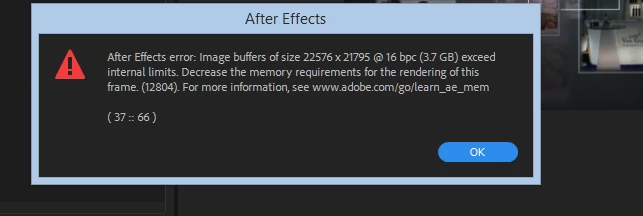
image buffers of size 22576/21795 @16 bpc exceed internal limits

  • July 31, 2018
  • 6 replies
  • 24670 views

hey

i'm getting this error, i'm trying to understand what it means, and how can i fix it.

i am using the most updated version of AE.

does this error mean there's a picture inside the sequence that's that big or what?
This topic has been closed for replies.

6 replies

Known Participant
September 16, 2024

When using 3D layers, the Advanced3D comp renderer, at the moment (v. 24.6.2), is the weakest. Today I tested it breaks a pixel over 8,000 x 5,592px as soon as any 3D layer is introduced.

Lemira
Participant
February 15, 2024

Maybe it will help someone. I got this error too. I hid each layer and found the frame causing the error. Everything worked after I exported it (png sequence), replaced it instead of the one causing the error.

Participant
December 14, 2023

hey i decrease the motion tile value i was using that effect and now its fixed

_Dean_
Participant
April 21, 2023

I had a similar error message. It only appeared once previewing at full res. Basically I had a simple solid within my comp that was 20000x20000. Once deleted/optimized the comp was fine again.

Participant
July 6, 2023

I'm currently having the same problem! How did you find out which part of the project was the problem?

Mylenium
Legend
July 31, 2018

What Jools said - you need to provide much more information what you are aactually doing/ trying to do. Damaged footage, excessively large layers and comps, specific effects and a million other things can cause such errors.

Mylenium

Leorbel
LeorbelAuthor
Participant
July 31, 2018

thank you,

i am using 3d layers, it's a templet I've been playing around with so i don't know exactly all the details. however when i tried to export a frame after the frame it crashed, everything was OK, so it's like a specific frame was making this issue.

@mj
Community Expert
Community Expert
July 31, 2018

Hi,

You need to reduce the complexity of the layers to bring your comp within image buffer limits.

  • Simplify layer effects
  • Pre render some layers to reduce the load on your computer.

You can check out Todd Kopriva's response to the same question here.

CreativeCOW

HTH

Inspiring
July 31, 2018

It sounds like you are working too large in your comp. Are you using 3d layers?

You'd need to post more info about what you are actually doing in After Effects, for anyone to help.