
melbendi
Inspiring
February 1, 2023
Answered

Import a list of names into separate text boxes?

  • February 1, 2023
  • 2 replies
  • 1405 views

Does anyone know of a way to import a list of names, currently in Excel, into separate text boxes in After Effects? The names are written in First Last format, as normally, with a space in between first and last.  I don't know how to create scripts, but I'm hoping someone might know of one I can download, maybe from AE Scipts, for example. Thank you for your help!
This topic has been closed for replies.
Correct answer ShiveringCactus

Mylenium has posted a link to quite a long and complicated looking tutorial (it's not that scary, but it looks like a lot of work)   


In a nutshell:

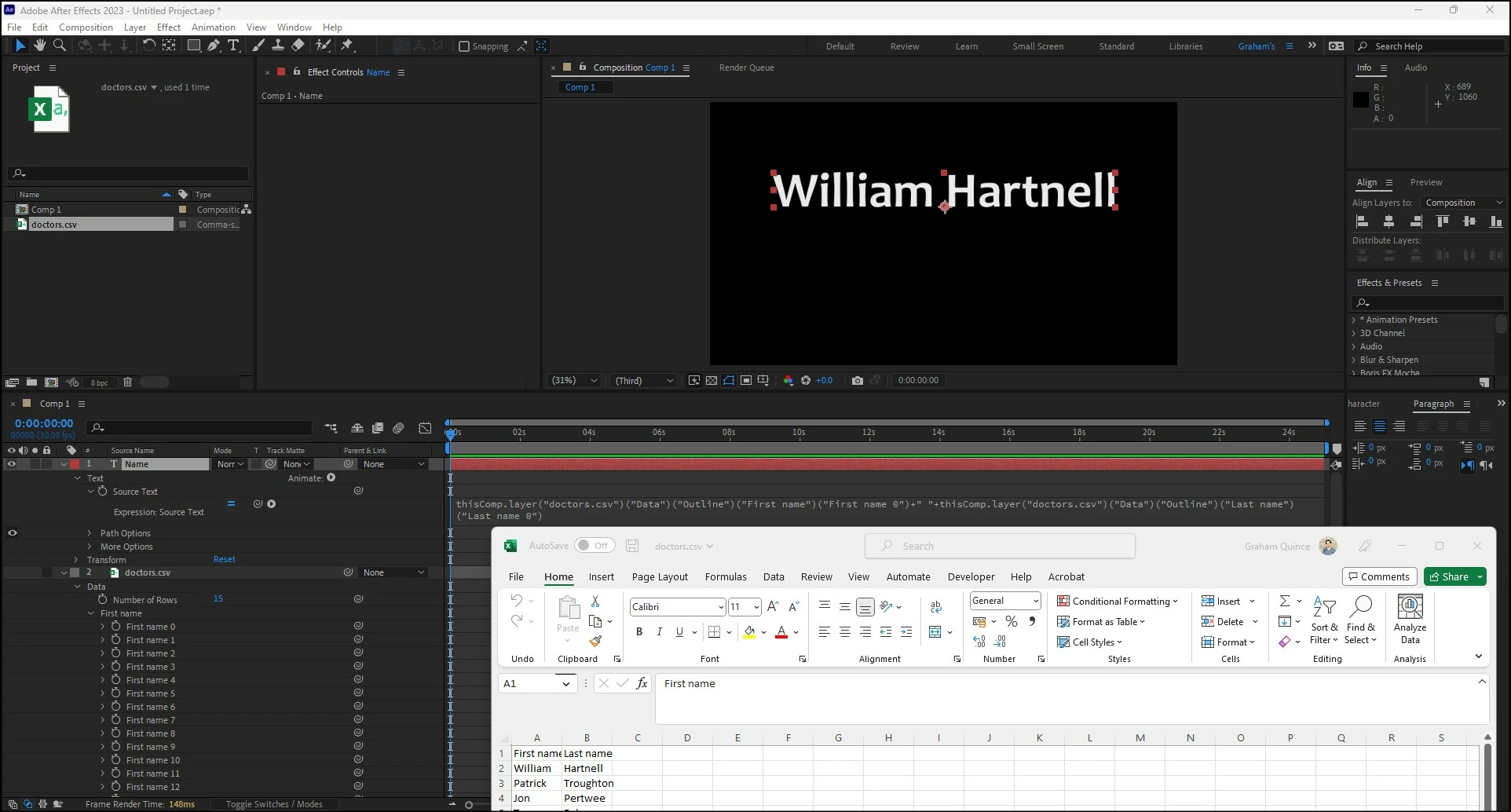
  • After Effects can import CSV files. 
  • These can be added to a timeline and the values can linked to by a text layer's source text


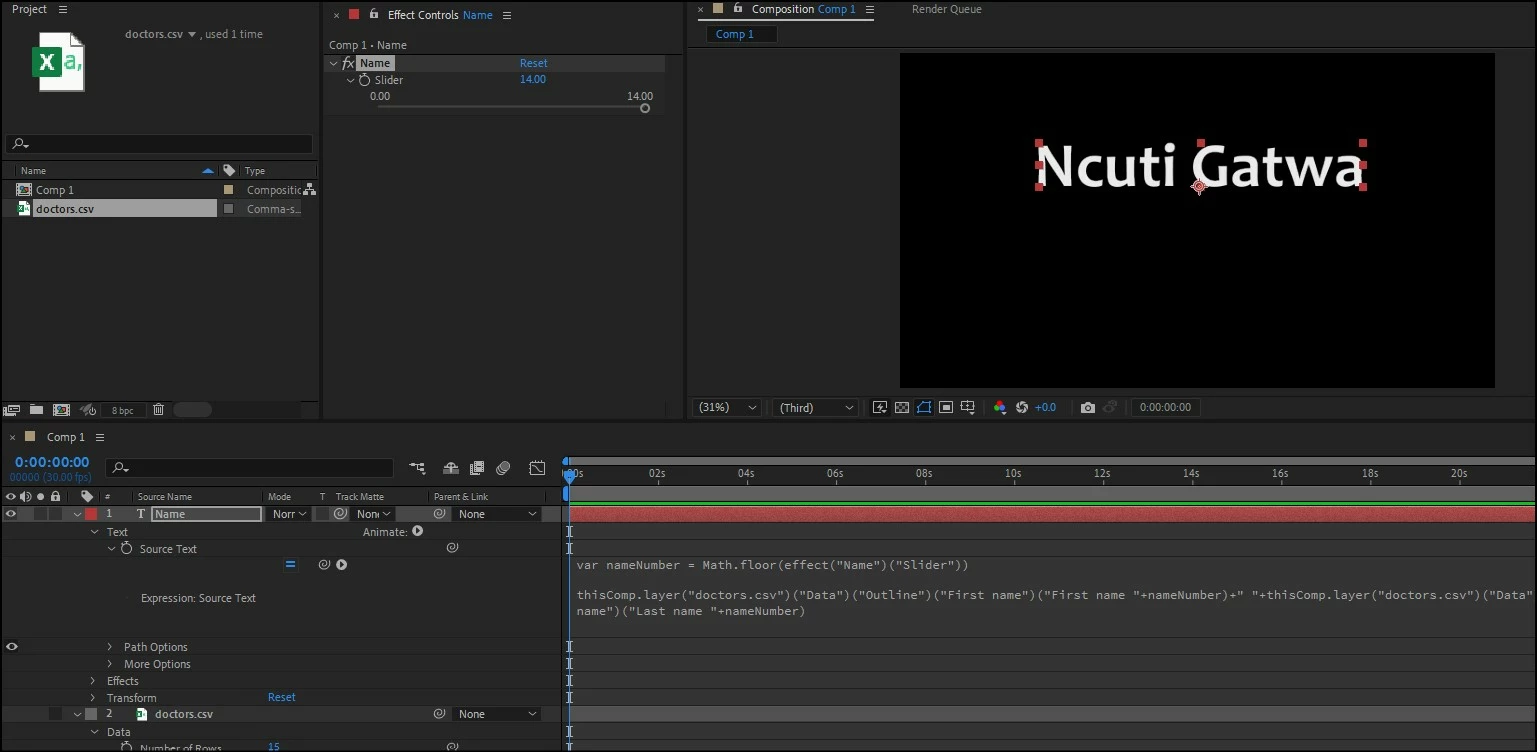
If you were to then attach a Slider expression control to the source text and use that to pick which name to display, you could then animate through all the names as you wish:

var nameNumber = Math.floor(effect("Name")("Slider"))

thisComp.layer("doctors.csv")("Data")("Outline")("First name")("First name "+nameNumber)+" "+thisComp.layer("doctors.csv")("Data")("Outline")("Last name")("Last name "+nameNumber)


In my example, I've used a single text layer and pointed it to two fields, but you could just point to one and have a second layer point to the other field.


2 replies

ShiveringCactus
Community Expert
ShiveringCactusCommunity ExpertCorrect answer
Community Expert
February 2, 2023

Mylenium has posted a link to quite a long and complicated looking tutorial (it's not that scary, but it looks like a lot of work)   


In a nutshell:

  • After Effects can import CSV files. 
  • These can be added to a timeline and the values can linked to by a text layer's source text


If you were to then attach a Slider expression control to the source text and use that to pick which name to display, you could then animate through all the names as you wish:

var nameNumber = Math.floor(effect("Name")("Slider"))

thisComp.layer("doctors.csv")("Data")("Outline")("First name")("First name "+nameNumber)+" "+thisComp.layer("doctors.csv")("Data")("Outline")("Last name")("Last name "+nameNumber)


In my example, I've used a single text layer and pointed it to two fields, but you could just point to one and have a second layer point to the other field.


melbendi
melbendiAuthor
Inspiring
February 9, 2023

Thank you both for your replies!  Sorry to disappear.  Mylenium, I looked at your link and realized the learning curve would take longer than doing it the old fashioned way, so I just got busy.  I ended up pasting the list to one long text field, and then braking it into 8 shorter lists that made 8 long but more reasonably sized precomps.  Then I made a comp sized for the longest name.  From there I just duplicated that comp and all I had to do was go from comp to comp sliding the precomp up one name, which was way faster than copying and pasting each name.  It worked out well and I got it done.  ShiveringCactus, thank you so much for explaining that so well!  I can actually understand it, and probably would have done it that way, but I didn't have time to switch gears at that point.  I'm going to try your method just to get familiar with it in case I'm in the same situation again. Thank you both for your help!  Both answers are correct, but I'll choose the one that seems to simplify the process for non-programmer designers like me. 😉

Mylenium
Legend
February 2, 2023