Participant
August 5, 2021
Answered

Import issues

  • August 5, 2021
  • 2 replies
  • 268 views

Hi all, 


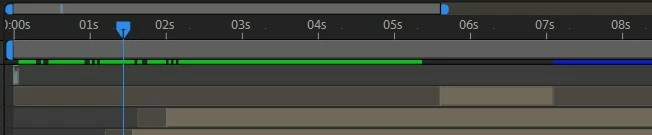
I have created a design in After Effects, artwork size matching that of After Effects. I am wanting to import the Ai file, and have done this as 'footage', followed by selecting 'layer size'. Once this is done, within the 'project' panel, it has documented the file type as 'vector...'. Also, after dragging and dropping it onto my composition, within the timeline, it has given me the tiniest amount to work with, unlike the standard import that fills the timeline. Please see attached, with the top layer of the timeline showcasing this issue.


Why is this happening? And how do I resolve?


Thanks,


Harley



This topic has been closed for replies.
Correct answer Byron Cortez

You are importing a sequence of images, if what you want is the Illustrator file only without a sequence then you should uncheck the "image sequence" check box when importing the footage. You do this by clicking on the "Options" button in the After Effects import window, uncheck the box and that's it.

2 replies

Byron CortezCommunity ExpertCorrect answer
Community Expert
August 5, 2021

You are importing a sequence of images, if what you want is the Illustrator file only without a sequence then you should uncheck the "image sequence" check box when importing the footage. You do this by clicking on the "Options" button in the After Effects import window, uncheck the box and that's it.

Byron.
Participant
August 6, 2021

As simple as that. Thank you so much!

Community Expert
August 7, 2021

You're welcome!

Byron.
Participant
August 5, 2021

Further to note: After narrowing the timeline to detail the frames, this is how much it has given me, and I cannot extend it any further. (Top layer again)