
Participant
October 13, 2025
Question

Import Psd to AE (After Effects)

  • October 13, 2025
  • 2 replies
  • 345 views

Hey guys,

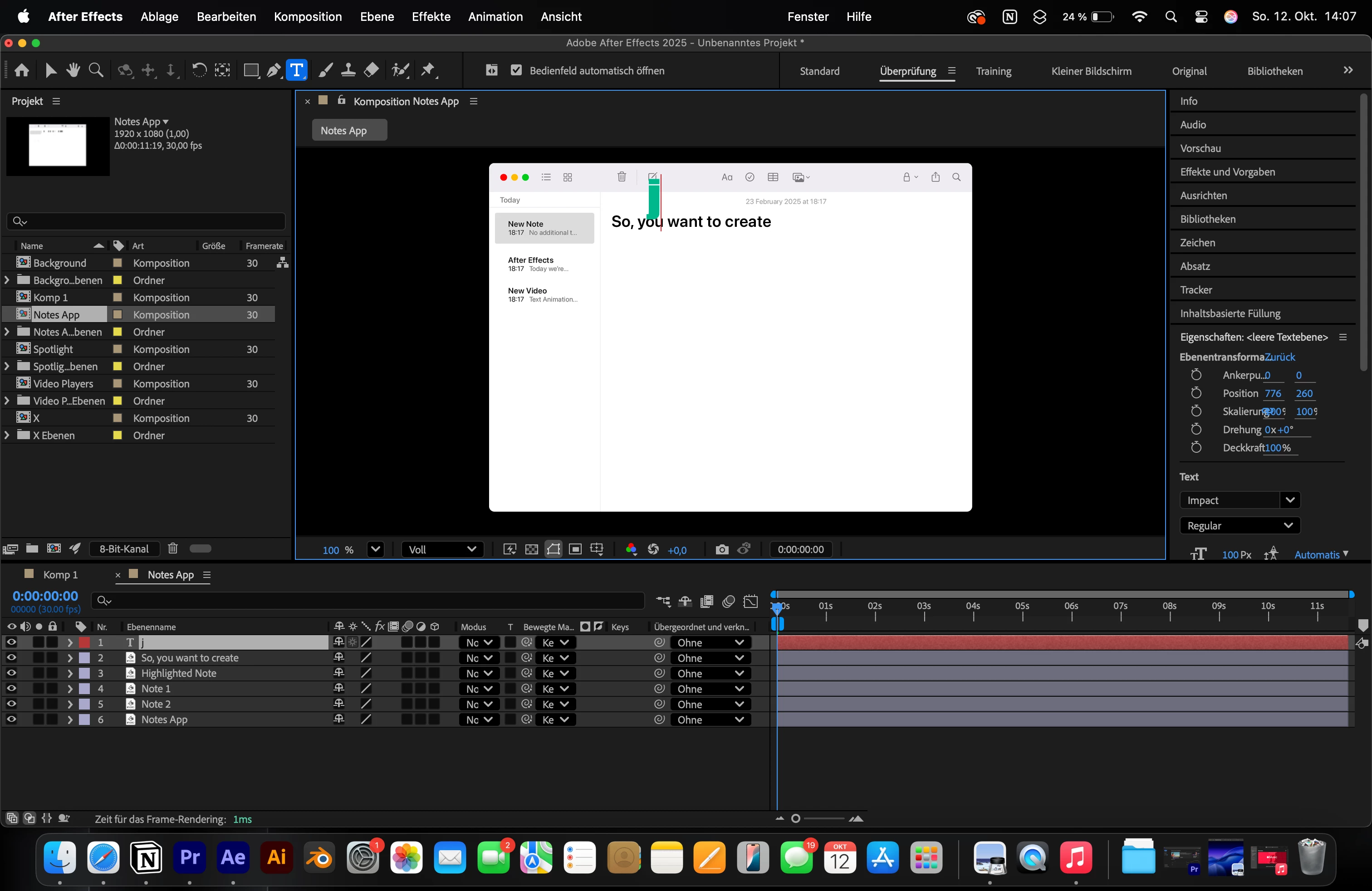
as you can see in the screenshot below, I imported some psd.files, but the problem is that the layers are not being regarded as Photoshop Layers by After Effects, as you can see in the timeline because there are no "Ps" symbols next to the layers, despite me, when I imported the file, choosing "Import as: Composition - Retain Layer Sizes".

Therefore, the text layer "So, you want to create" is not even regarded as a text layer for example..

I tried solving this problem for hours, but have not been able to fix it yet...
 

2 replies

Participating Frequently
October 14, 2025

Hey it is because the file is saved in the wrong color mode, usually CMYK. AE only treats layers properly when the PSD is in RGB mode, otherwise it flattens everything and removes text and layer data.


To fix it, open your PSD in Photoshop, go to Image → Mode → RGB Color, then save the file again. After that, re-import it into After Effects using File → Import → File, and make sure you select “Composition – Retain Layer Sizes.”


Once you do this, the “Ps” icons should appear next to each layer and text layers will behave normally.

jonzerounAuthor
Participant
October 14, 2025

Hey, thanks for your help, but the color mode was and still is a RGB.

Therefore, this will not fix my problem. 😕😕


nishu_kush
Legend
October 13, 2025

Thanks for reaching out,jonzeroun.


It could you related to File Association. Try changing it to Photoshop if it's not already. In Finder, right-click any PSD file > Get Info > select Photoshop in the "Open With" drop-down and click "Change All" right below it.

Let me know if it helps.


Thanks,
Nishu

jonzerounAuthor
Participant
October 13, 2025

Thanks for your reply.

Unfortunately, I already had those settings.

So, it did not fix my problem.

Is there another solution?


nishu_kush
Legend
October 14, 2025

Is it happening with a specific file or all of them? What happens if you double-click a Photoshop file? Does it launch Photoshop and open the file? Can you share the PSD file with me for testing? Feel free to share via DM.


Thanks,
Nishu