
Participant
March 30, 2018
Answered

Importing Premiere Pro sequence with text elements - now precomped

  • March 30, 2018
  • 2 replies
  • 3739 views

I have a workflow where I layout text placeholders to the beats / sections of a song in a premiere sequence.  I do this so i can use the text layers as guides for the text I need to recreate in AE.

With these new versions of AE and Premiere (I only recently updated from CC 2015 to CC 2018) - the text elements now come in as sequence long nested precomps so I can't see the actual text element length and location in the sequence unless i open the precomps
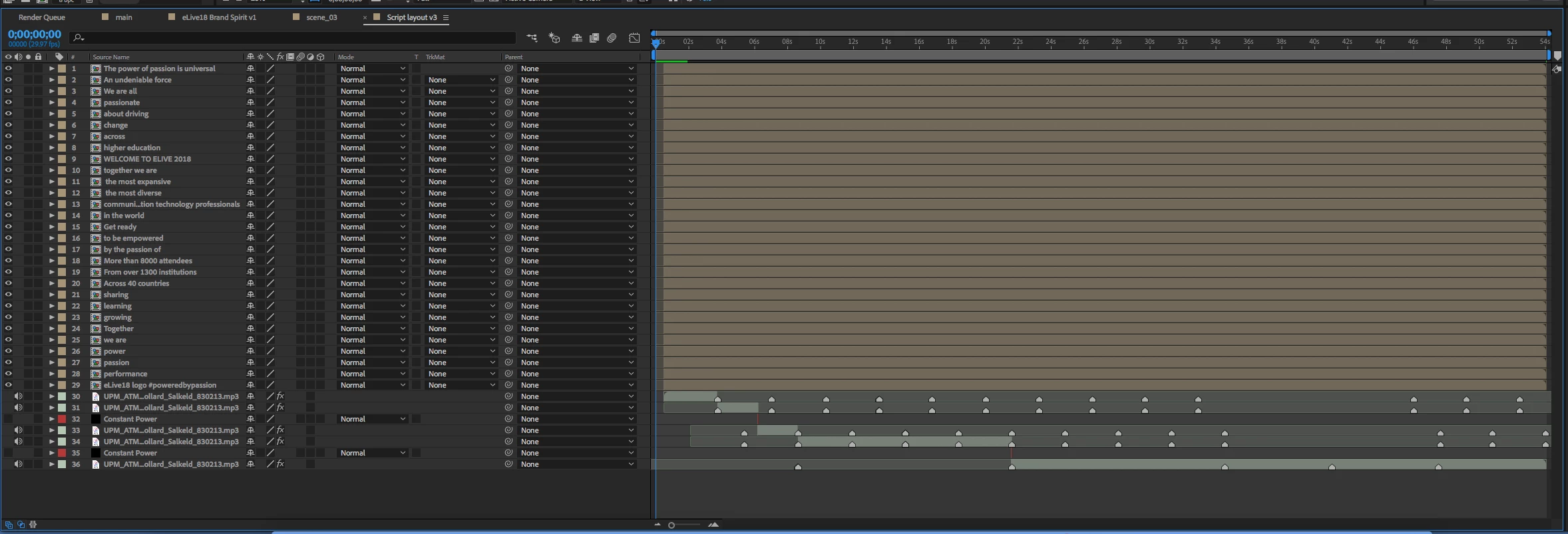
Please note that in the image above the music track comes in as individual clips on their own layers based on the cuts in the sequence.  This is how the text used to function as well.

Looking for a workaround or some way to avoid this type of import of text elements - I'd really like to have all the "loose" text elements laid out individually in the AE comp instead of these sequence long precomps which do not serve my purpose.

Thanks for any guidance and/or assistance

This topic has been closed for replies.
Correct answer Kyle Hamrick

I've run into this before myself. I agree this is frustrating and tedious, but it is technically expected behavior with the way things are currently built. Because of the way the Premiere text engine works, it's creating the text element within a container layer (which can have transforms on both the text element and the layer itself, and can hold multiple text layers, other graphic elements, etc.) In effect, it is indeed a "comp," in AE terms.

I completely agree that the expected behavior (and more usable workflow) for a single Premiere text layer would be for it to import as a single AE text layer, not a precomp. For your current issue, the copy/paste route is a fine solution, or there's also a pay-what-you-want AE script that would be helpful here. Un-PreCompose - aescripts + aeplugins - aescripts.com

I suggest you also do what I just did (thanks for reminding me of this annoyance) and file a feature request for single Premiere text layers to be treated as single AE text layers. Perhaps in future versions, this behavior could be made more user-friendly.
Feature Request/Bug Report Form

2 replies

Inspiring
October 12, 2022

I have the same issue. It's totally annoying. I block action with text in my edit and then paste my basic edit into AE so i get get down to building animation. The length of the text pieces is very pertinent and I lose that when I get to AE, or rather I have to go and manually pull the text pieces out of their precomps.


It would be useful to just have a checkbox in AE that specifies how we want text elements handled on import/paste. Similar to the AICB option when we past paths from illustrator into AE.

Basically AE is totally awesome and every Adobe program, even InDesign should be able to send it's stuff to AE as transparently as possible. Thanks!

I'll check out that script too and see if it helps.

AdobetinaAuthor
Participant
March 30, 2018

I'm going through and opening precomps - cutting out the text element and then pasting it back into the main comp - this is tedious - is there a better way?

Kyle Hamrick
Community Expert
Kyle HamrickCommunity ExpertCorrect answer
Community Expert
March 30, 2018

I've run into this before myself. I agree this is frustrating and tedious, but it is technically expected behavior with the way things are currently built. Because of the way the Premiere text engine works, it's creating the text element within a container layer (which can have transforms on both the text element and the layer itself, and can hold multiple text layers, other graphic elements, etc.) In effect, it is indeed a "comp," in AE terms.

I completely agree that the expected behavior (and more usable workflow) for a single Premiere text layer would be for it to import as a single AE text layer, not a precomp. For your current issue, the copy/paste route is a fine solution, or there's also a pay-what-you-want AE script that would be helpful here. Un-PreCompose - aescripts + aeplugins - aescripts.com

I suggest you also do what I just did (thanks for reminding me of this annoyance) and file a feature request for single Premiere text layers to be treated as single AE text layers. Perhaps in future versions, this behavior could be made more user-friendly.
Feature Request/Bug Report Form

AdobetinaAuthor
Participant
March 30, 2018

Thanks Kyle - glad to know I'm not the only one!

I just filed the feature request so hopefully they can find a way to make it work or atleast give us an option between the two kinds of imports.

I'm going to check out that script too - might be helpful in a bunch of scenarios.  Luckily I work in short formats so my manual work around was okay for today.