
Legend
Mar 17, 2021 1:04 PM UTC
Answered

In AE, Mocha, how to get mask to track evenly when the corner points don't exist ?

Still working this one... hours of frustration.


In Mocha, trying to mask the bus ad so I can replace it.  It moves from left to right.


I'm replacing the bench ad with a new bench ad.


Here is how it starts:

I made an estimate of where the left side would be.
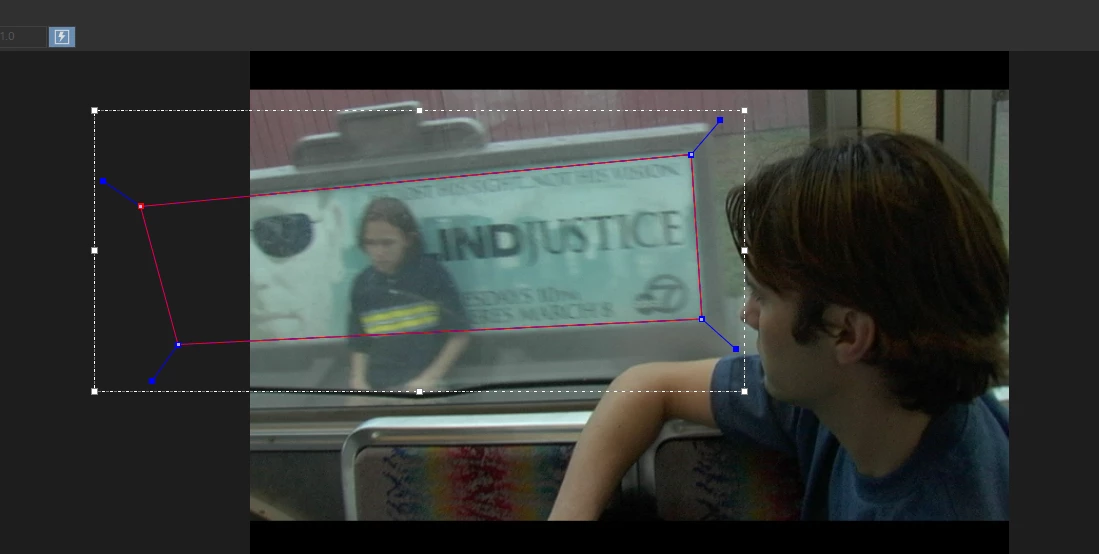
 

But when I track it,  the left and right side goes out of whack and I get this:
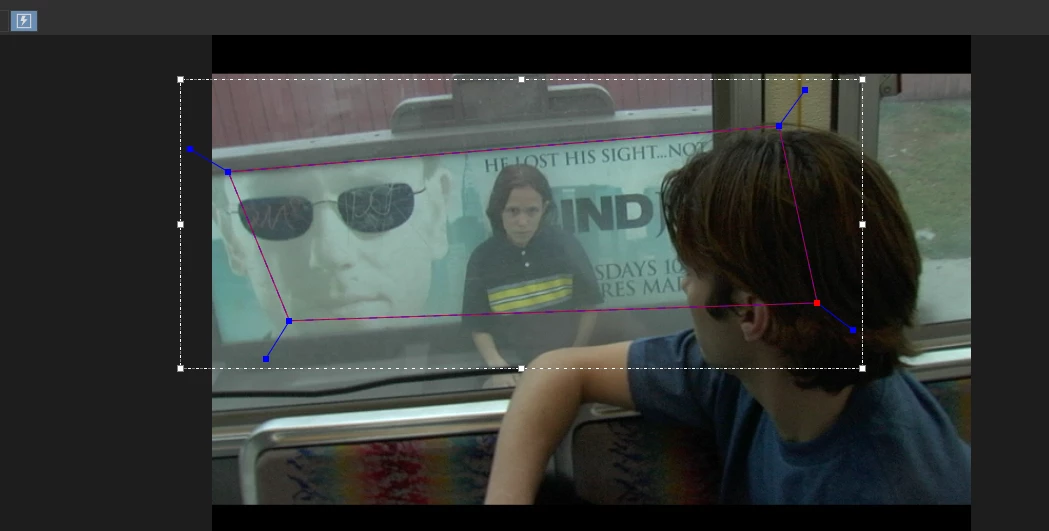
If I manually adjust the splines, they never come out perfectly square, because I have to "guess" where the bench ad will be, because it goes out of frame.


Has to be a perfect mask, because I'm replacing the image, and when the mask goes crooked, the new ad image bends and warps.


I tried the "AdjustTrack"  and it gave me the 4 red points, but how can I install the 4 points, when 2 of my starting points are out of the frame?  I tried, didn't work.


The tutorials all have masks that are entirely in the frame. 


My left side starts out of frame, and the right side later goes out of frame.


I've seen 6 videos on AdjustTrack in Mocha and I can't find one with my problem.


Thanks for your help and time! or a tutorial referral would be great.

Letty

This topic is closed to new replies. Start a new post to keep the conversation going.
Rick GerardCorrect answer
Community Expert
Mar 26, 2021 2:02 AM UTC

The Stabilized Power Pin tutorial is ready. It should help you figure out your shot.

Enjoy

20 replies

Participant
Nov 28, 2021 10:45 AM UTC

  people asking for a 3D animation as i also need same video for 3D image processing,  https://www.youtube.com/watch?v=0ToPGhr_muI/ i found this video from youtube very helpful for 3D process. it just solved the problem.

Translate
Participant
Feb 2, 2022 8:47 AM UTC

did some body tried this video https://www.youtube.com/watch?v=0ToPGhr_mu.

Translate
Rick GerardCommunity ExpertCorrect answer
Community Expert
Mar 26, 2021 2:02 AM UTC

The Stabilized Power Pin tutorial is ready. It should help you figure out your shot.

Enjoy

Translate
Letty2019Author
Legend
Mar 26, 2021 4:45 AM UTC

I can't wait to get started!   Thank you so very much for your help. The tutorial looks great! I hope your video helps other people as well with a similar issue.  Thanks again Rick for the super help!


Translate
Community Expert
Mar 19, 2021 8:29 PM UTC

Used a screen recording of your shot and came up with this in just a few minutes. I'll add it to a tutorial I'm working on and post it soon.


Translate
Letty2019Author
Legend
Mar 20, 2021 5:56 AM UTC

I'm dying over here!  How did ya do that??


Translate
Community Expert
Mar 18, 2021 5:00 PM UTC

I just sent you a private message. Let me know as soon as you can and I'll post the workflow for your specific shot.

Translate
Letty2019Author
Legend
Mar 19, 2021 3:53 AM UTC

The ball is in your court! 

Thanks!

Letty

Translate
Letty2019Author
Legend
Mar 18, 2021 2:27 PM UTC

Found some simple tutorials to extend the track point when it goes out of frame.


One simple track that goes out of frame:

https://www.youtube.com/watch?v=hsxZZgDUlpY


Going way, way out of frame:

https://www.youtube.com/watch?v=N1SbVsFktmw


This doesn't help me, because I need 3D motion tracking,  but, if you have a 2D image that goes in and out of frame, this is it.


Translate
Participant
Mar 18, 2021 3:56 PM UTC

Thanks for sharing a useful video https://www.youtube.com/watch?v=N1SbVsFktmw. This video solved my problem within 15 minutes. 

Translate
Letty2019Author
Legend
Mar 19, 2021 3:54 AM UTC

Isn't that great?  Works great for 2D,  waiting to see what Rick posts for a 3D solution.

Translate