
Answered
In After Effects plug-in development, how can I make a checkbox disable other UI components?
Hello,
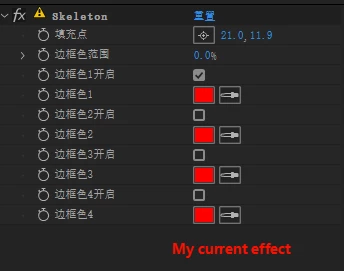
I’m new to After Effects plug-in development. I want to make a checkbox control disable (gray out) the color picker next to it. How can I implement this?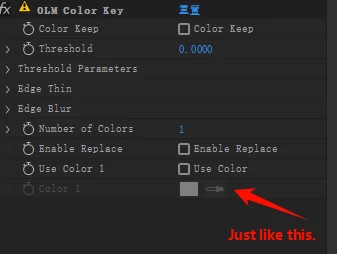
#include "Skeleton.h"
//-------------------------------------------------------------------------------------------------
static PF_Err About(PF_InData* in_data, PF_OutData* out_data, PF_ParamDef* params[], PF_LayerDef* output) { // About关于窗口
AEGP_SuiteHandler suites(in_data->pica_basicP);
suites.ANSICallbacksSuite1()->sprintf(out_data->return_msg,
"%s v%d.%d\r%s",
"插件名字",
MAJOR_VERSION,
MINOR_VERSION,
"about信息\rAn empty (skeletal, if you will) effect sample,\r for your modifying pleasure.\rCopyright 2007-2023 Adobe Inc."
);
return PF_Err_NONE;
}
//-------------------------------------------------------------------------------------------------
static PF_Err GlobalSetup(PF_InData* in_data, PF_OutData* out_data, PF_ParamDef* params[], PF_LayerDef* output) { //初始化插件
out_data->my_version = PF_VERSION(
MAJOR_VERSION,
MINOR_VERSION,
BUG_VERSION,
STAGE_VERSION,
BUILD_VERSION);
//out_data->out_flags = PF_OutFlag_PIX_INDEPENDENT; // just 16bpc, not 32bpc
out_data->out_flags = 0;
out_data->out_flags2 = 0;
return PF_Err_NONE;
}
//-------------------------------------------------------------------------------------------------
static PF_Err ParamsSetup(PF_InData* in_data, PF_OutData* out_data, PF_ParamDef* params[], PF_LayerDef* output) { //插件ui初始化
PF_Err err = PF_Err_NONE;
PF_ParamDef def;
AEFX_CLR_STRUCT(def); PF_ADD_POINT("填充点", 1, 1, NULL, POINT_DISK_ID);
AEFX_CLR_STRUCT(def); PF_ADD_FLOAT_SLIDERX("边框色范围", 0.0, 100.0, 0.0, 100.0, 0.0, PF_Precision_TENTHS, PF_ValueDisplayFlag_PERCENT, 0, GAIN_DISK_ID);
AEFX_CLR_STRUCT(def); PF_ADD_CHECKBOXX("边框色1开启", TRUE, PF_ParamFlag_SUPERVISE, CHECKBOX1_DISK_ID);
AEFX_CLR_STRUCT(def); PF_ADD_COLOR("边框色1", PF_MAX_CHAN8, 0, 0, COLOR1_DISK_ID);
AEFX_CLR_STRUCT(def); PF_ADD_CHECKBOXX("边框色2开启", FALSE, PF_ParamFlag_SUPERVISE, CHECKBOX2_DISK_ID);
AEFX_CLR_STRUCT(def); PF_ADD_COLOR("边框色2", PF_MAX_CHAN8, 0, 0, COLOR2_DISK_ID);
AEFX_CLR_STRUCT(def); PF_ADD_CHECKBOXX("边框色3开启", FALSE, PF_ParamFlag_SUPERVISE, CHECKBOX3_DISK_ID);
AEFX_CLR_STRUCT(def); PF_ADD_COLOR("边框色3", PF_MAX_CHAN8, 0, 0, COLOR3_DISK_ID);
AEFX_CLR_STRUCT(def); PF_ADD_CHECKBOXX("边框色4开启", FALSE, PF_ParamFlag_SUPERVISE, CHECKBOX4_DISK_ID);
AEFX_CLR_STRUCT(def); PF_ADD_COLOR("边框色4", PF_MAX_CHAN8, 0, 0, COLOR4_DISK_ID);
out_data->num_params = SKELETON_NUM_PARAMS;
return err;
}
//-------------------------------------------------------------------------------------------------
static PF_Err MySimpleGainFunc8(void* refcon, A_long xL, A_long yL, PF_Pixel8* inP, PF_Pixel8* outP) {
PF_Err err = PF_Err_NONE;
GainInfo* giP = reinterpret_cast<GainInfo*>(refcon);
PF_FpLong tempF = 0;
PF_Pixel8 COLOR1, COLOR2, COLOR3, COLOR4;
if (giP) {
// 容错范围
tempF = giP->gainF * PF_MAX_CHAN8 / 100;
COLOR1 = giP->COLOR1;
COLOR2 = giP->COLOR2;
COLOR3 = giP->COLOR3;
COLOR4 = giP->COLOR4;
PF_Pixel8 tempP;
if (inP->alpha <= 0) {
// 完全透明的像素显示为不透明白色
tempP.alpha = PF_MAX_CHAN8;
tempP.red = PF_MAX_CHAN8;
tempP.green = PF_MAX_CHAN8;
tempP.blue = PF_MAX_CHAN8;
}
else if (inP->alpha >= PF_MAX_CHAN8) {
// 不透明像素保持原始颜色
tempP = *inP;
}
else {
// 部分透明的像素,按 alpha 叠加白色背景
tempP.alpha = PF_MAX_CHAN8;
tempP.red = (inP->red * inP->alpha + PF_MAX_CHAN8 * (PF_MAX_CHAN8 - inP->alpha)) / PF_MAX_CHAN8;
tempP.green = (inP->green * inP->alpha + PF_MAX_CHAN8 * (PF_MAX_CHAN8 - inP->alpha)) / PF_MAX_CHAN8;
tempP.blue = (inP->blue * inP->alpha + PF_MAX_CHAN8 * (PF_MAX_CHAN8 - inP->alpha)) / PF_MAX_CHAN8;
}
// 检测tempP是否与目标颜色相同
if ((abs(tempP.red - COLOR1.red) <= tempF && abs(tempP.green - COLOR1.green) <= tempF && abs(tempP.blue - COLOR1.blue) <= tempF) ||
(abs(tempP.red - COLOR2.red) <= tempF && abs(tempP.green - COLOR2.green) <= tempF && abs(tempP.blue - COLOR2.blue) <= tempF) ||
(abs(tempP.red - COLOR3.red) <= tempF && abs(tempP.green - COLOR3.green) <= tempF && abs(tempP.blue - COLOR3.blue) <= tempF) ||
(abs(tempP.red - COLOR4.red) <= tempF && abs(tempP.green - COLOR4.green) <= tempF && abs(tempP.blue - COLOR4.blue) <= tempF)) {
// 如果相同,输出白色
outP->alpha = PF_MAX_CHAN8;
outP->red = PF_MAX_CHAN8;
outP->green = PF_MAX_CHAN8;
outP->blue = PF_MAX_CHAN8;
}
else {
// 如果不同,输出黑色
outP->alpha = PF_MAX_CHAN8;
outP->red = 0;
outP->green = 0;
outP->blue = 0;
}
}
return err;
}
//-------------------------------------------------------------------------------------------------
static PF_Err Render(PF_InData* in_data, PF_OutData* out_data, PF_ParamDef* params[], PF_LayerDef* output) { //渲染,在首次应用插件,以及更改插件参数值时执行
PF_Err err = PF_Err_NONE;
AEGP_SuiteHandler suites(in_data->pica_basicP);
/* Put interesting code here. */
GainInfo giP;
AEFX_CLR_STRUCT(giP);
A_long linesL = output->extent_hint.bottom - output->extent_hint.top;
giP.gainF = params[SKELETON_GAIN]->u.fs_d.value;
// 记录哪些颜色被启用
giP.use_COLOR1 = params[SKELETON_CHECKBOX1]->u.bd.value;
giP.use_COLOR2 = params[SKELETON_CHECKBOX2]->u.bd.value;
giP.use_COLOR3 = params[SKELETON_CHECKBOX3]->u.bd.value;
giP.use_COLOR4 = params[SKELETON_CHECKBOX4]->u.bd.value;
giP.COLOR1 = params[SKELETON_COLOR1]->u.cd.value;
giP.COLOR2 = params[SKELETON_COLOR2]->u.cd.value;
giP.COLOR3 = params[SKELETON_COLOR3]->u.cd.value;
giP.COLOR4 = params[SKELETON_COLOR4]->u.cd.value;
ERR(suites.Iterate8Suite2()->iterate(in_data,
0, // progress base
linesL, // progress final
¶ms[SKELETON_INPUT]->u.ld, // src
NULL, // area - null for all pixels
(void*)&giP, // refcon - your custom data pointer
MySimpleGainFunc8, // pixel function pointer
output));
return err;
}
//-------------------------------------------------------------------------------------------------
extern "C" DllExport PF_Err PluginDataEntryFunction2(PF_PluginDataPtr inPtr, PF_PluginDataCB2 inPluginDataCallBackPtr, SPBasicSuite* inSPBasicSuitePtr, const char* inHostName, const char* inHostVersion) {
PF_Err result = PF_Err_INVALID_CALLBACK;
result = PF_REGISTER_EFFECT_EXT2(
inPtr,
inPluginDataCallBackPtr,
"Skeleton", // Name
"ADBE Skeleton", // Match Name
"Sample Plug-ins", // Category
AE_RESERVED_INFO, // Reserved Info
"EffectMain", // Entry point
"https://www.adobe.com"); // support URL
return result;
}
//-------------------------------------------------------------------------------------------------
PF_Err EffectMain(PF_Cmd cmd, PF_InData* in_data, PF_OutData* out_data, PF_ParamDef* params[], PF_LayerDef* output, void* extra) { //主函数
PF_Err err = PF_Err_NONE;
try {
switch (cmd) {
case PF_Cmd_ABOUT:
err = About(in_data, out_data, params, output);
break;
case PF_Cmd_GLOBAL_SETUP:
err = GlobalSetup(in_data, out_data, params, output);
break;
case PF_Cmd_PARAMS_SETUP:
err = ParamsSetup(in_data, out_data, params, output);
break;
case PF_Cmd_RENDER:
err = Render(in_data, out_data, params, output);
break;
}
}
catch (PF_Err& thrown_err) {
err = thrown_err;
}
return err;
}


 AdChoices