larsrietkerk
Participant
October 10, 2017
Question

Inaccurate ruler guides in After Effects

  • October 10, 2017
  • 2 replies
  • 2086 views

Hello,

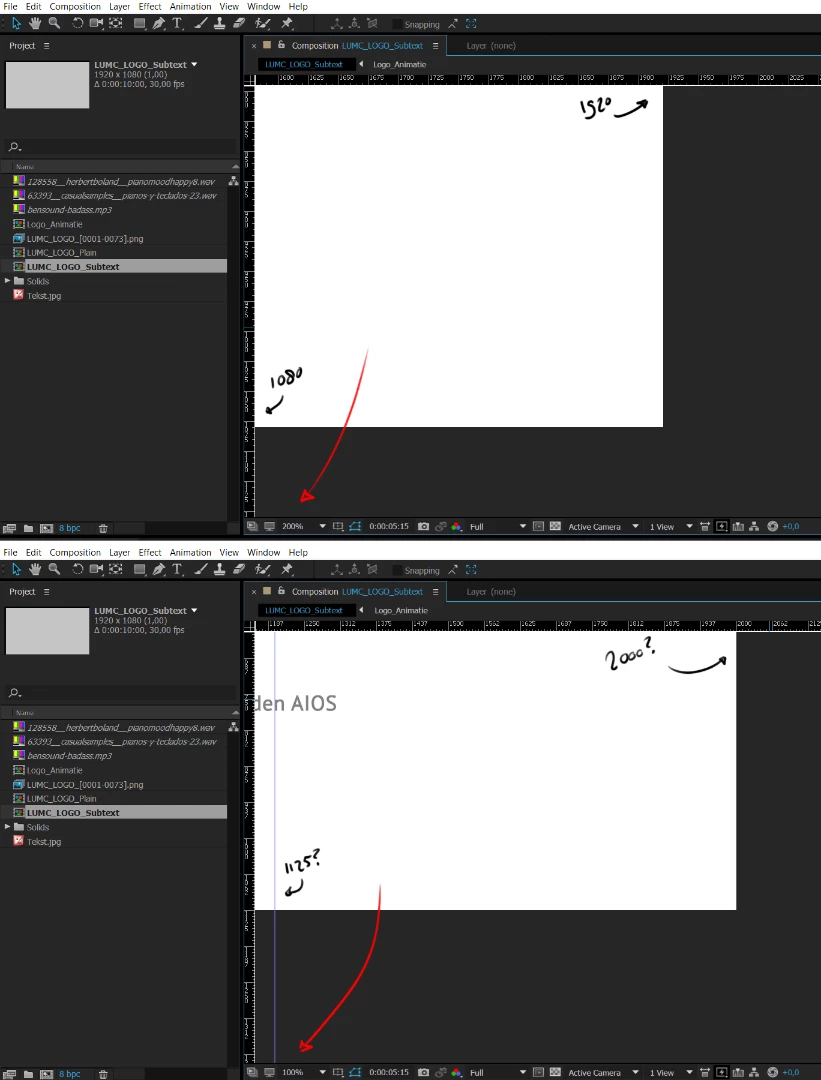
My rulers are displaying inaccurate pixel values at different zoomlevels. Is there a way to fix that? The correct size of my composition is 1920 x 1080.
This topic has been closed for replies.

2 replies

Participating Frequently
June 19, 2018

Having the same issue on PC running windows 7 professional, CC2017. It seemed to become an issue after switching from 1920x1080 monitors to 2560x1440. Bug fix for retina displays obviously wouldn't apply in my case.

Community Expert
October 10, 2017

Check your zero points at the top left corner. You the 0, 0 origin is set by clicking here and dragging:

You reset by double-clicking. That should make the top left corner read zero for both X and Y and the left and bottom should line up with your composition frame size dimensions.

larsrietkerk
Participant
October 11, 2017

Hey Rick,

Thanks for the reply. I'm afraid it doesn't do the job, at least not at the 100% zoomlevel or lower, it switches between two different (and wrong) values. Maybe it's a bug. My work around is staying at 200% zoomlevel : /

Community Expert
October 11, 2017

I can't reproduce the but. Is you AE up to date? What is your OS?