



Roland Kahlenberg
Legend
July 27, 2026

Incorrect layer boundary for 3D Meshes
  • July 27, 2026
  • 3 replies
  • 24 views


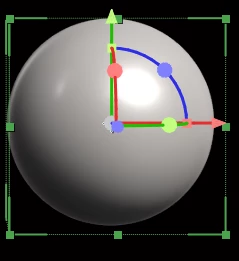
As seen in this image, the rect boundary of the right and bottom edges are not correctly displayed - there are gaps between the visual presence of pixels and the rect boundary. 

This is a critical issue that affects solutions that require pixel-perfect layouts. 

This issue affects a few 3D Mesh Types. 

It will be good to know, early, if this will be resolved or if this is an as-designed feature so that I and others who find this issue to be debilitating can look at alternative solutions.TIA.


    3 replies

    David.Arbor
    Community Manager
    Community Manager
    July 28, 2026

    Hey Roland,


    This isn’t actually a bug, it’s a perspective thing. The front face of the bounding box is closer to the camera than the circumference of the sphere. If you switch to an orthographic view like Front or Top, you’ll see the bounding box perfectly aligns with the sphere. If you’re making pixel perfect layouts with 3D objects, you’d really have to be in a front view anyway, or at least fake a parallel camera by having an incredibly long focal length.


    -David, After Effects Engineering Team

    Roland Kahlenberg
    Legend
    July 29, 2026

    Heya Dave, thanks for the reply. I did check the Orthogonal Views early on and you’re - ALMOST!  :-D

    It’s a case of comparing Apples and Oranges - there is no issue in the orthogonal views - this does not mean all is fine in the perspective views nor should we assume both sets of views perform the same calculations. 

    For my case, there is no issue with extruded Texts and Shape Layers but only for 3D Meshes with non-square edges. 

    So, with a 2-Up View (Top and Active Cam) - if you start with the 3D Cube Mesh, as is, and then crank up its Bevel  Radius Radius, you will see the edges of the Cube in the Perspective View shrinks inwards regardless of the camera type - and all is well in the Top View.

    Now, if you perform a similar routine with extruded Texts and Shape Layers, no such issue. 

    My thoughts are this shrinking of the edges is due to tiny primitive shapes used to draw 3D meshes - when rounded or bevelled (which creates roundness, inherently), parts of these primitive shapes disappears but the app does not re-calculate the 3D Rect Boundary and relies on the default, pre-rounded/bevelled shapes. 

    On the workaround, I did think about it - theoretically it should work but it’s going to requires tests (for code + test) time and during runtime, it’s going to add compute time. 

    So, my thoughts are to double check with engineering - the shrinkage in the visual size of the cube when its bevel size is large (to see the artefact) should mean its 3D Rect Boundary should update. And if this is agreed, then all shapes that are non-rect should also have their default 3D Rect Boundary be re-calculated. 

    Of course, I could be imagining all of these and MSU  :-D  

    TIA

    Very Advanced After Effects Training | Adaptive & Responsive Toolkits | Intelligent Design Assets (IDAs) | MoGraph Design System DEV
    Roland Kahlenberg
    Legend
    July 27, 2026

    This issue affects all 3D Meshes with curved edges and this includes the Cube if its Bevel Radius is set sufficiently high for this issue to be seen. 

    It looks like the engineer(s) got their math incorrect or at least they calculated the rect boundary based on something more primitive in shape and this is what the rect boundary is based on instead of the final/visual representation in the composition. 


    Very Advanced After Effects Training | Adaptive & Responsive Toolkits | Intelligent Design Assets (IDAs) | MoGraph Design System DEV