
Inspiring
April 18, 2017
Answered

Insert/Use Registered Trademark Symbol

  • April 18, 2017
  • 1 reply
  • 14247 views

Very new to AE.  I have 2 places where I need to insert the registered trademark (i.e. circle with R inside) and I want to include it in a 3D display.

I couldn't find Glyphs in AE and import from Illustrator hasn't allowed me to extrude for 3D purposes.  I haven't figured out how to make a circle with no fill and then place my R inside the circle.

Any help would be greatly appreciated.  Thanks in advance.
This topic has been closed for replies.
Correct answer Roei Tzoref
import from Illustrator hasn't allowed me to extrude for 3D purposes

right click on the illustrator layer and choose -> create shapes from vector layer. shapes will allow you, under the Ray-Trace/Cinema4D renderer, to extrude.

I couldn't find Glyphs in AE

none available yet

you can just copy paste the glyph from the web to a text layer. here it is:

®

Text layers and Shape layers are the only layers that allow extrusion in Ae.

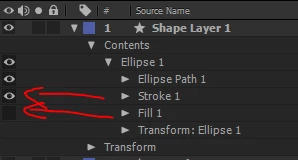
BTW if you want to create it by yourself just type the letter R, and for the circle create a shape with just a stroke. you can customize the shape when you twirl down its content menu

or highlight the shape layer and when selecting the paremetric shape tools or the pen tool you can customize it in the fill/stroke options in the tools menu

1 reply

Roei Tzoref
Roei TzorefCorrect answer
Legend
April 18, 2017
import from Illustrator hasn't allowed me to extrude for 3D purposes

right click on the illustrator layer and choose -> create shapes from vector layer. shapes will allow you, under the Ray-Trace/Cinema4D renderer, to extrude.

I couldn't find Glyphs in AE

none available yet

you can just copy paste the glyph from the web to a text layer. here it is:

®

Text layers and Shape layers are the only layers that allow extrusion in Ae.

BTW if you want to create it by yourself just type the letter R, and for the circle create a shape with just a stroke. you can customize the shape when you twirl down its content menu

or highlight the shape layer and when selecting the paremetric shape tools or the pen tool you can customize it in the fill/stroke options in the tools menu

RR456Author
Inspiring
April 18, 2017

Thank you Roei!

Turning off the Fill in the Contents Menu gave me the outline of the circle.  Now I can place the R inside it.

Thanks again for your quick assistance.

Roei Tzoref
Legend
April 18, 2017

You're welcome for training resources visit here: https://helpx.adobe.com/after-effects/tutorials.html
