
Astonishing_Cascade5EF7
Participant
January 17, 2018
Answered

Installed font on computer doesn't appear on After Effects font list

  • January 17, 2018
  • 10 replies
  • 76509 views

Hello,

It seems that I'm having some problem using a font that I have installed on my computer but it's not appearing on After Effects font list.

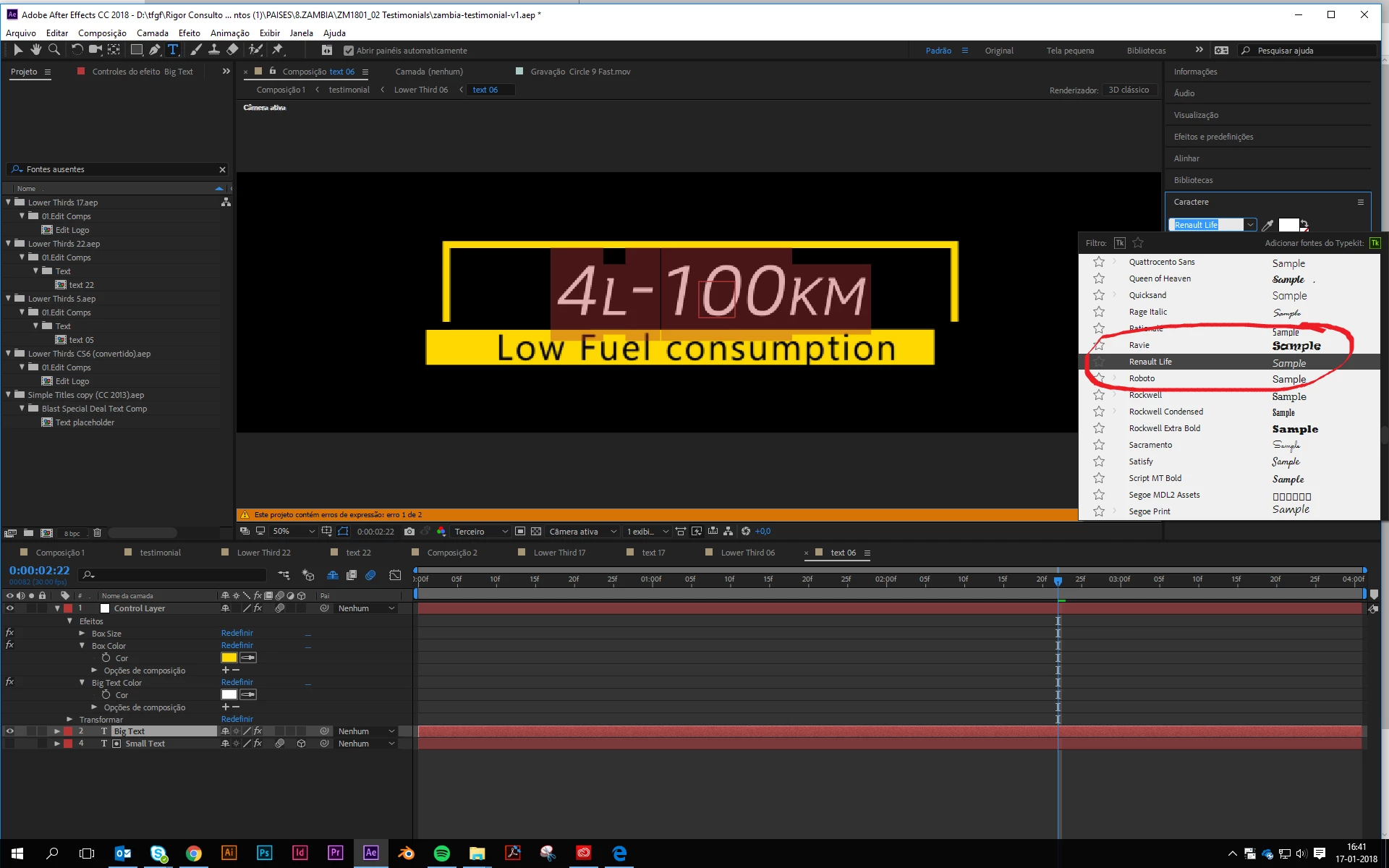
The weirdest thing is that the font has several weights, but only one appears one - Italic, as the image shows.

The font is not on TypeKit, because it's the Renault brand font. So, if anyone has any idea on how to help me, please, I would really appreciate it !

(I have the newest version of After Effects CC)
Correct answer Rick Gerard

Not all fonts are supported in AE. For third-party fonts, you may have to uninstall and reinstall or find another source for the same font. Some fonts may work in Illustrator but not in AE. If your font works in Illustrator and you are not relying on text animators you could convert the type to outlines in AI and get that to work.

If you are using Adobe Typekit they should work if properly synced. I'd un-sync and resync if you are using Typekit.

10 replies

EliMagaziner
Participant
February 13, 2024

I had the same issue, and apparently this little trick by AstroFalcon fixed it!
the tip is to open a "Fonts" folder in:   Program Files> Common Files> Adobe 
and then he copy\pasted the problematic fonts in there. I tried it and amazingly it worked

Participant
March 19, 2025

This worked perfectly.  Just add a folder called "fonts" and duplicate the ones Adobe is missing. Boom problem solved. 

Participant
April 13, 2023

I had the same problem! so im solved has using FontForge to change the name and format to the same information to the font thats work and adding the variable name (bold, regular, black, ... ). I generated the otf/ttf file then installed and it was appears available in AE

Participant
January 10, 2023

I have the same problem. I import psd with text as composition in AE and choose CREATE/CONVERT TO EDITABLE TEXT. After this AE start to read this font and the problem was gone. It was not nessesery to import fonts never again.

Participant
January 10, 2023

import*psd files

Participant
November 24, 2022

I had the same problem and I solved it. In my case, the font that doesn't appear on AE font list is Montserrat. So, I just go to adobe font then type in search "montserrat" and click activate font. This worked for me.

Participant
April 29, 2022

I had this problem and the answer was much simpler. The one type that showed had no gaps in the name where as the others had gaps. So in my case by changing Sofia Pro Regular.ttf to SofiaProRegular.ttf meant I could see the font in After Effects.

Participant
September 3, 2020

Just go back to install 17.2 and mine worked fine.

Participant
April 30, 2018

I also found a lot of font load/activation issues with v15.1. Downgraded to v15.01 and issues resolved.

Participant
April 12, 2018

I found that in AE2018 v 15.1 a bug with local fonts. If you downgrade to AE2018v15.01 (build73) and everything worked.

Participating Frequently
June 30, 2023

here's the correct answer as usual: adobe bug.

Participating Frequently
June 30, 2023

I have to say, I'm yet again discovering a whole new batch of very annoying bugs in AE 23 along these lines. It seems as though any font in my imported photoshop file gives me the "font not available" message when converting to text. In some cases, looking at the font list in AE the font actually IS there, and the "missing font" shows up next to it as the name of the font with /font1 afterward for some reason. Even in this case, if I simply select the font from the list to show it that the font is in fact there, the font works except for SOME letters. wtf? 

In other cases, it thinks the font is not there at all and doesn't even show up on the list. And in addition to the font issues, I had a ton of weird issues where aspects of my photoshop document didn't carry over such as drop shadows, adjustment layer effects etc. I bring photoshop documents into AE for a living and don't normally have these issues. They just started now with 23.

Combine that with having to downgrade Premiere by a version just to make it run at all, and it's another day lost to these programs absolutely sucking. 

Inspiring
January 17, 2018

What is probably happening: The Renault brand fonts have the same "system" name across all the weights, meaning that Windows/Adobe sees each weight as the same font and is only loading one of them at a time. This could easily just be lousy craftsmanship on the font-maker's end. One way to test is to uninstall the italic version and see if a different weight is what shows up in AE (other than Italic). If this turns out to be the case you can try opening the font with a font editor (Font Forge or something similar) and re-saving as a different name.

Rick GerardCommunity ExpertCorrect answer
Community Expert
January 17, 2018

Not all fonts are supported in AE. For third-party fonts, you may have to uninstall and reinstall or find another source for the same font. Some fonts may work in Illustrator but not in AE. If your font works in Illustrator and you are not relying on text animators you could convert the type to outlines in AI and get that to work.

If you are using Adobe Typekit they should work if properly synced. I'd un-sync and resync if you are using Typekit.

Participating Frequently
February 26, 2024

Thanks,

Great, so Whitney which my company purchased won't show up in my corporate video. Might as well toss it, can't use it if it's not branded. I completed the video promo and now Whitney is defaulting. Come on Adobe.