
Participant
May 2, 2019
Answered

Is it possible to do per pixel scale wiping/stretching ?

  • May 2, 2019
  • 5 replies
  • 1485 views

In after effects exists an effect called Scale wipe.

Which scales one half of a frame around an anchorpoint
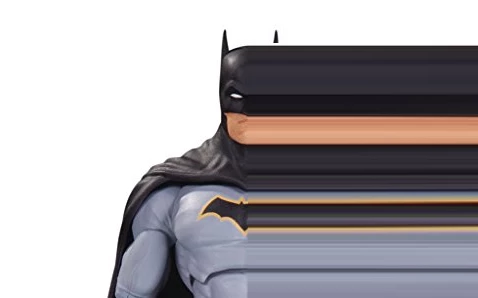
My problem is, that i now need to do this just on the edge of a subject.

Basically a per pixel Scale wipe. So each pixel gets scaled around its own anchorpoint.
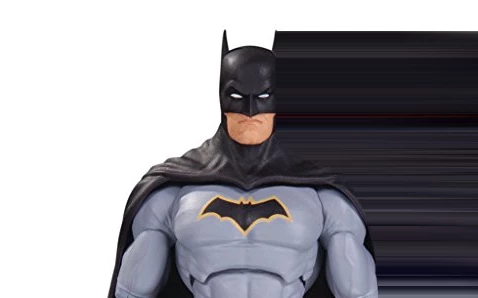
And if that wasn't hard enough i also need this to work on a moving subject.

In my mind i would take a rotoscoped subject. Tell AE to go 10 pixels or so inwards/to the left from that mask and then do a per pixel scale warp from there.

Im currently doing this mockup in PS by not doing this per pixel but taking 20-40 pixel blocks. The same principle works in AE, but for a moving subject the manual labor of animating 10-20 masks + their anchorpoint for a 1min video is just insane.

Any ideas if this is even achievable in AE. Is this doable with scripting ?

Is there another program that can do this ?

Correct answer Mylenium

Is this doable with scripting ?

No. Neither scripts nor expressions access pixel data. The rest does not matter. You have to generate a mask or matte somehow, regardless whether you animate it by hand or e.g. generate it by using channel effects operations. No magic buttons here. Even third-party tools and effects will need som guidance and can't guess what they are supposed to process.

Mylenium

5 replies

MaxvanLeeuwen
Participant
November 18, 2025

I know this is years ago, but in case someone is looking for a solution: Pixel Repeat creates this effect! I made the plugin myself, it stretches the last pixel(s) of a matte. Hope this is helpful!

nishu_kush
Community Manager
Community Manager
November 18, 2025

That's a great one. Thanks for creating and sharing the plug-in.


Thanks,
Nishu

Roland Kahlenberg
Legend
May 2, 2019

This looks like CC Scale Wipe, which is bundled with AE. You'll find it in Effect>Transition>CC Scale Wipe

Very Advanced After Effects Training | Adaptive & Responsive Toolkits | Intelligent Design Assets (IDAs) | MoGraph Design System DEV
Jose Panadero
Community Expert
Community Expert
May 2, 2019

You can create this effect using Effect > Keying > Keylight. Even if you are not doing chroma key, it has an option to work over the edges of your image. Set the Source Crops for x&y axis to Repeat and change the values for Left, Right, Top or Bottom to recreate the effect you are looking for. Check the attached image.

I think that there is a plug-in called Pixel Sorter on Aescripts.com that recreates the effect with more advanced options but it's a paid one. https://aescripts.com/ae-pixel-sorter/

Community Expert
May 2, 2019

That kind of effect was popular about 10 years ago. It's easily recreated with a duplicate layer, a mask, and a huge x scale factor.

If you want to sample just the edge pixels then you could try duplicating the layer, masking the subject you want to stretch, duplicate the masked layer, animate the position of the middle copy, pre-compose the middle copy, apply the Echo effect to the pre-comp using the composite in front option, then use the top copy as a track matte for the animated pre-comp. You can get something like this quite easily. It looks like what you want to do. The screenshot shows the modified properties of all layers, the pre-comp just has a quick left to right animation, and yes, if you do a good roto, that will work with a moving subject and give you some very interesting results.

If you are curious, that's Me with Jessica Morris, our leading lady in our short film "Destiny". Look for the feature sometime late this year, and yes, that is how quickly I took advantage of the opportunity to photobomb our star.

Mylenium
MyleniumCorrect answer
Legend
May 2, 2019

Is this doable with scripting ?

No. Neither scripts nor expressions access pixel data. The rest does not matter. You have to generate a mask or matte somehow, regardless whether you animate it by hand or e.g. generate it by using channel effects operations. No magic buttons here. Even third-party tools and effects will need som guidance and can't guess what they are supposed to process.

Mylenium