
Participant
July 18, 2021
Answered

Is it possible to turn the 3D gizmo off?

  • July 18, 2021
  • 3 replies
  • 7486 views

I've recently upgraded to the newest AE and have been getting the hang of the new 3D gizmo and its various modes.  However, I've had problems doing precise adjustments to anchor point location and motion path curves on 3D layers since I often end up selecting one of the many gizmo transform handles so close to the curve handles or the gizmo itself, which is a pretty visually busy tool, obscures the precise pixels I'm trying to adjust the anchor point to. Is it possible to turn the 3D gizmo off or revert it to the old "gizmo," at least temporarily?  I've been able to find workarounds, but overall my workflow would be quicker if I could turn it off or revert it to the old tool when making those adjustments.
Correct answer Warren Heaton

Yes.


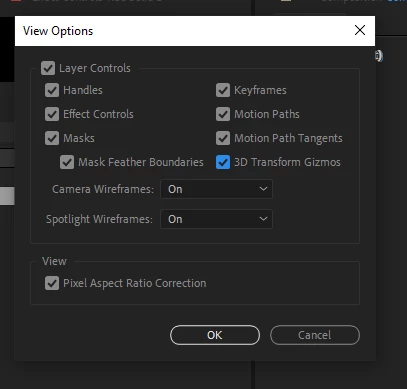
While the Composition panel is in focus, choose View > View Options and uncheck 3D Transform Gizmo.


Or, you can Show/Hide layer controls by choosing View > Show Layer Controls.  I find the keyboard shortcut for this to be very helpful while designing in After Effets.


You can also open a New Viewer (View > New Viewer) and set one to show the Layer Controls and the other to hide them.

3 replies

Participant
March 13, 2025

You can show/hide layer controls by choosing View > Show Layer Controls. "This helped in my case."

Mohammad.Harb
Community Expert
Community Expert
July 18, 2021

Using the shortcut is very helpful

Mac: Cmd + shift + H  

windows: ctrl + shift + H

Warren Heaton
Community Expert
Warren HeatonCommunity ExpertCorrect answer
Community Expert
July 18, 2021

Yes.


While the Composition panel is in focus, choose View > View Options and uncheck 3D Transform Gizmo.


Or, you can Show/Hide layer controls by choosing View > Show Layer Controls.  I find the keyboard shortcut for this to be very helpful while designing in After Effets.


You can also open a New Viewer (View > New Viewer) and set one to show the Layer Controls and the other to hide them.

Inspiring
April 13, 2022

I'm looking in V22.4.0 but don't appear to have a 'View Options'?

nishu_kush
Legend
April 13, 2022

Hi Matt, 


Go to View > View Options. Or click the hamburger menu and select View Options.

Hope it helps.


Thanks,

Nishu