
Dr ZeroThrE
Participant
March 8, 2023
Question

Is there a shortcut to align beginning of pre comp to playhead in AE?

  • March 8, 2023
  • 1 reply
  • 1676 views

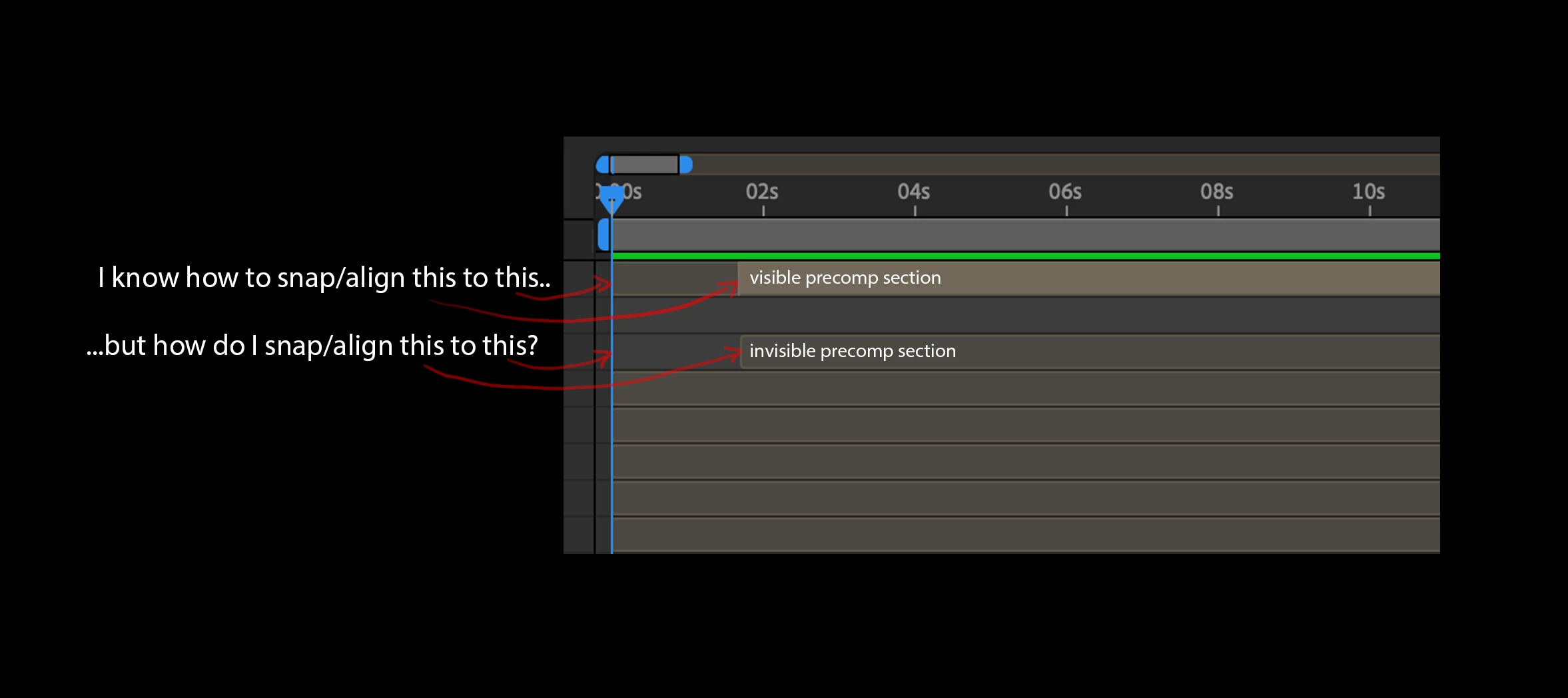
Hey folks, wondering if anyone can tell me the shortcut to align the beginning of a precomp to the playhead in AE, or even just to the exact beginning of the comp?  I know how to align and snap the active, visible section of a precomp to the playhead using “[“ or “]” but can’t figure out how to align the actual beginning of the pre comp to the playhead or even the comp beginning.  Thanks for any info!
1 reply

Community Expert
March 9, 2023

Try using the left and right square bracket key [ or ] to snap the start or end of a layer to the CTI (Current Time Indicator).

Dr ZeroThrE
Participant
March 9, 2023

Thanks for responding - using the bracket keys only aligns the active section of a precomp to the CTI, but doesn’t align the ACTUAL beginning of a pre comp layer to the CTI (if that makes sense).  

Warren Heaton
Community Expert
Community Expert
February 12, 2026

@Dr ZeroThrE 

It sounds like you want an extend (option/alt left bracket) rather than a move (left bracket).

You can also hover over the In of the Layer’s Time Span such that the mouse turns into a left-right arrow and then click and drag to the left until you reach the Current Time Indicator.  If you hold Shift after you start the click and drop, the Layer In will snap to the CTI.


The attached screen recording shows this.


Pictured: Mouse hovering over the In of the Layer Time Span