
Participant
May 2, 2018
Answered

Is there an expression to have masks adapt to a sourceRectAtTime text box?

  • May 2, 2018
  • 3 replies
  • 6315 views

I have looked everywhere for an answer to my problem and I cant find it anywhere.

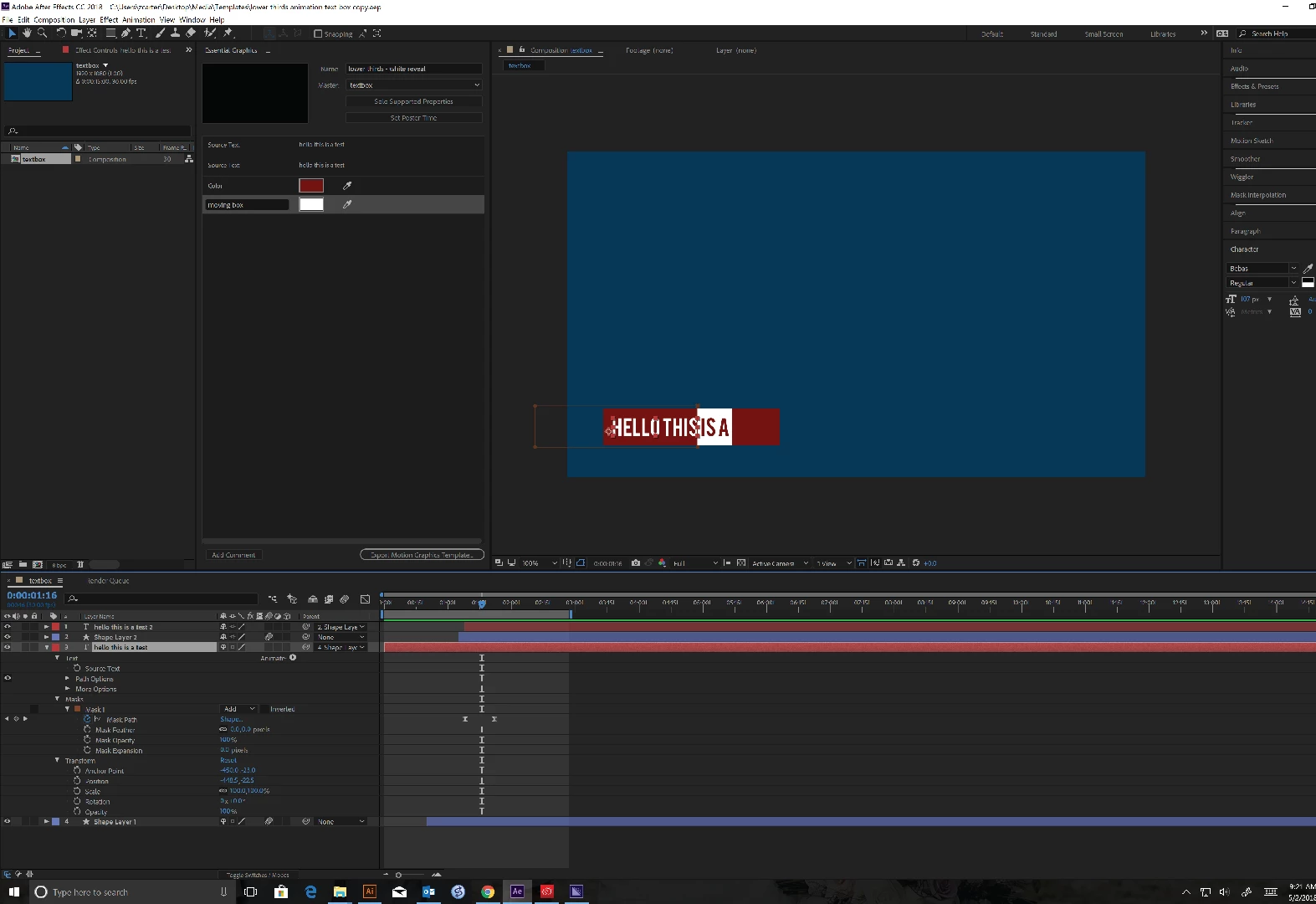
I am making a lower third template to use on future projects that involves a shape that adapts to whatever text is written using sourceRectAtTime.

I wanted to make a unique animation and what I came upon was to have the text reveal itself left to right with a mask of the same shape and text (with inverted colors) leading the animation. (see video for visual representation)

Following that mask I have a mask of just the original text following that mask.

Whenever I change the text size obviously the box changes size so I have to resize all of the masks and the keyframes of those 2 masks to make the animation work.

MY QUESTION IS:

Is there a way to make those two masks adapt to the text boxes so that they can just resize to the beginning and end of the shapes automatically with the keyframes adapting to the length as well making the animation the same speed always.

I havent read anything about a masking being able to adapt to a shape so I am unsure whether this is possible.

Let me know thanks!

I am using After Effects CC 2018
<!-- Generator: Adobe Illustrator 22.1.0, SVG Export Plug-In  --><svg version="1.1" xmlns="http://www.w3.org/2000/svg" xmlns:xlink="http://www.w3.org/1999/xlink" xmlns:a="http://ns.adobe.com/AdobeSVGViewerExtensions/3.0/" x="0px" y="0px" width="4369px" height="3000px" viewBox="0 0 4369 3000" style="enable-background:new 0 0 4369 3000;" xml:space="preserve"><defs></defs><image style="overflow:visible;" width="4369" height="3000" xlink:href="DAECA475.jpg" ></image></svg>

This topic has been closed for replies.
Correct answer Rick Gerard

You can use the generated text box as a track matte. You cannot directly drive a mask from sourceRectAtTime.

You might be able to derive the width of the generated rectangle and use that as an endpoint for your animated square. I don't see any need for a mask in your project. I would use track mattes.

3 replies

Participant
May 4, 2019

I'm a novice but I found a work around. I couldn't get a mask to scale with padding and needed a solution.

I removed all my masks. Then I duplicated my different elements and created a matte for each. I trimmed off the paths that I wanted the matte to stay out of. Then I removed the original shape by making it not visible. All of my essential graphic controls still work when I do it this way.

Kyle Hamrick
Community Expert
Community Expert
May 2, 2018

You *can* drive a mask with sourceRect, but it's fairly complicated. I agree with Rick that track mattes are probably the way to go here.

You might also have a look at this, if you're doing something like this a lot. Effect Matte - aescripts + aeplugins - aescripts.com

Kyle Hamrick
Community Expert
Community Expert
May 2, 2018

Also, if you're wanting your white wiper to be dynamic as well (I'm guessing you do), here's a suggestion:

Create a slider control, animate from 0 to 100.

Using the linear function, you could this up so the wipe's position is referencing the sourceRect for the start/end points of its move, and the slider is effectively functioning as 0% complete - 100% complete, similar to the Start/End values in several effects, Trim Paths, and such.

It'd be easiest to create some variables, but you'll likely end up with something like this.

var slider = (linked to slider control);
var leftSide = (desired layer).sourceRectAtTime().left;   (Gives you the left edge)
var rightSide = (desired layer).sourceRectAtTime().left+sourceRectAtTime().width;    (Gives you the right edge)

linear (slider, 0, 100, leftSide, rightSide)

This will likely need some padding so it doesn't start EXACTLY at the edges, and if you're actually referencing another layer, you'll have to build that into the code.

Jake Bartlett has some great videos on YouTube that should give you all the pieces to do this, if you're not already familiar with the functions. Jake In Motion - YouTube

Community Expert
May 2, 2018

I would use the layer in-point to start the animation instead of a slider. I have about 150 animations presets that use this technique. I don't have time to write the expression for you but take a look at this preset that will fly any layer in from the left side. Just position the layer where you want it to end up, apply the animation preset and the layer will fly in from the left, bounce to a stop, then fall off the screen. Set an in and out point and you're done. Layer scale doesn't matter.

Dropbox - flyInBounceDropOut.ffx

I would just pick up the left and right edges of the generated rectangle and modify this code so the track matte and the white box flew in.

Rick GerardCommunity ExpertCorrect answer
Community Expert
May 2, 2018

You can use the generated text box as a track matte. You cannot directly drive a mask from sourceRectAtTime.

You might be able to derive the width of the generated rectangle and use that as an endpoint for your animated square. I don't see any need for a mask in your project. I would use track mattes.