Participant
October 16, 2022
Question

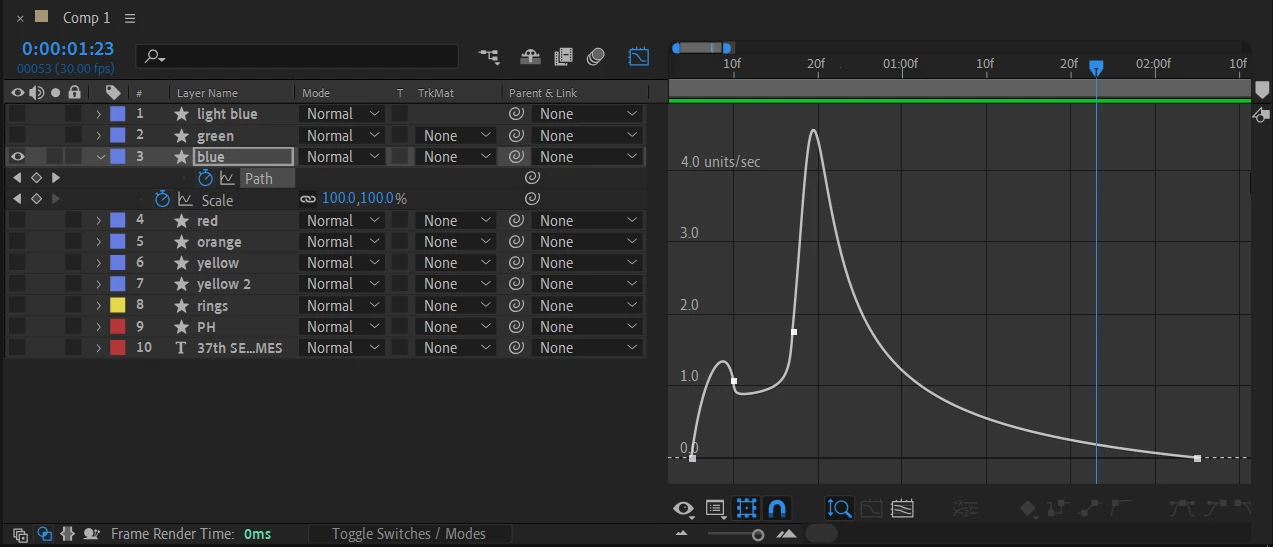
Is there any way to make the speed graph a continuous bell-shaped curve?

  • October 16, 2022
  • 1 reply
  • 219 views

Is there any way to make the speed graph a continuous bell-shaped curve? I'm using speed graph in animating paths and the curve always goes down after the second keyframe. It always forms an M shape instead of a bell.
This topic has been closed for replies.

1 reply

Mylenium
Legend
October 16, 2022

Select the points, edit the tangents. If you need more control, use the Anchor Point to Null scripts to create expression controllers for each pooint and tweak those.


Mylenium

Participant
October 16, 2022

I can only edit the handles horizontally (since it's the speed graph?), and it's very hard to make it bell-shaped.


Community Expert
October 16, 2022

The speed graph is just that, speed. If you move 200 pixels in 10 frames, then 400 pixels in 4 frames, there is nothing you can do other than change the position of the keyframes to get a smooth acceleration and deceleration between the 3 keyframes. It's a matter of math. Going from 0 pixels per second to 0 pixels per second between three keyframes with the maximum speed in the middle requires the distance, not the time, between the three keyframes to be the same. That's the only way to get a bell-shaped curve unless you select all keyframes, right-click, and choose Rove Over Time.