
Participant
September 19, 2022
Answered

Is there any way to preview the main composition while animating in a nested composition?

  • September 19, 2022
  • 1 reply
  • 787 views

I'm in a peculiar situation where I was given a character rig in a nested composition and I also have to interact with it outside that nested composition, and that poses a bottleneck problem having to swap back and forth between nested and main composition to match things. It's really slowing me down.

Is there a way to preview both compositions at the same time?
This topic has been closed for replies.
Correct answer Jose Panadero

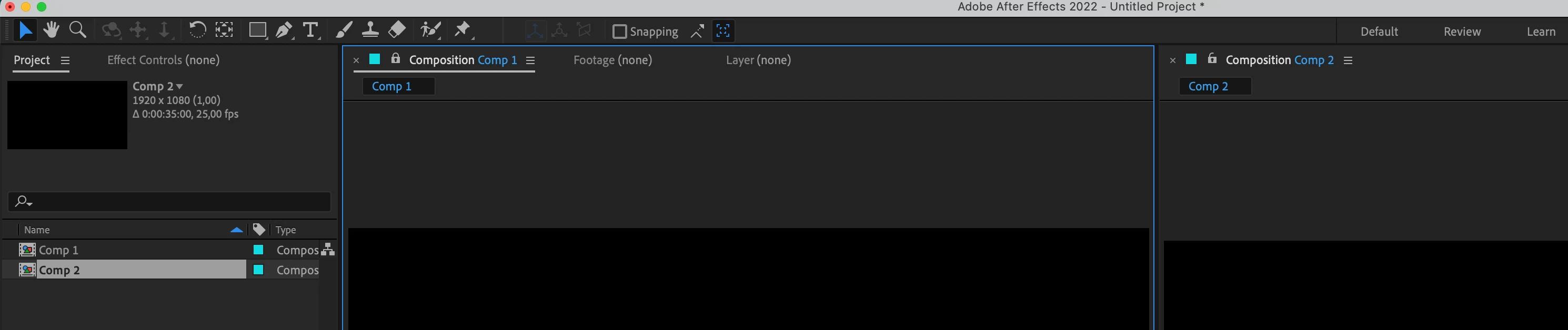
You can have a second Composition window open. Click on the keylock icon on the composition panel and then go to View > New Viewer to create a new viewer for a secondary composition. This way you can accomodate the two composition viewer to making changes into the precomp and the view the end result in the final composition. Check attached image. Hope it helps.


1 reply

Jose Panadero
Community Expert
Jose PanaderoCommunity ExpertCorrect answer
Community Expert
September 19, 2022

You can have a second Composition window open. Click on the keylock icon on the composition panel and then go to View > New Viewer to create a new viewer for a secondary composition. This way you can accomodate the two composition viewer to making changes into the precomp and the view the end result in the final composition. Check attached image. Hope it helps.


Participant
September 19, 2022

That did it! Thanks for the tip!

Jose Panadero
Community Expert
Community Expert
September 19, 2022

Glad to help!