
Inspiring
February 5, 2025
Answered

Issue with Time Remapping

  • February 5, 2025
  • 1 reply
  • 710 views

Hi community! 


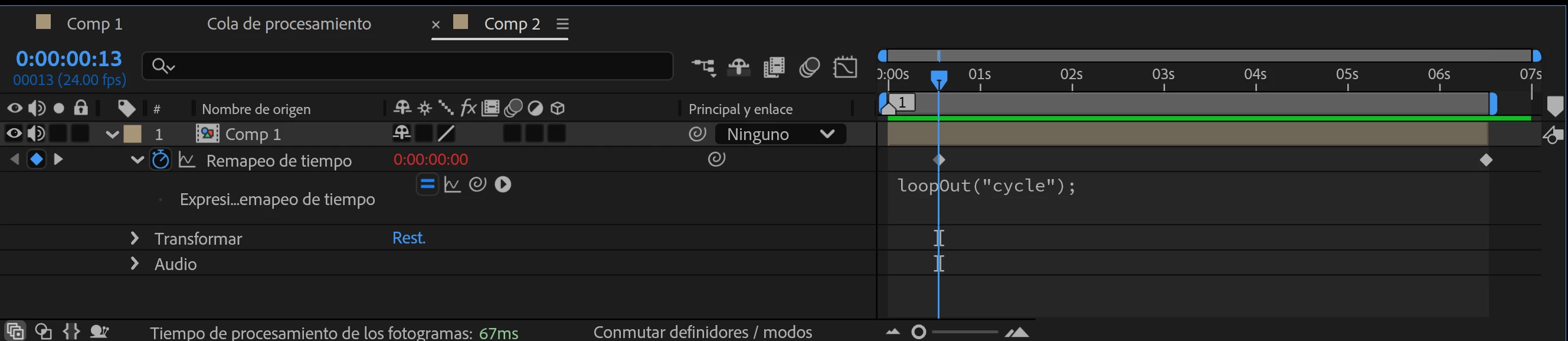
I'm running into an issue with this property. I'm sure this is an easy fix but I don't really understand how it works. I have a composition and I want to loop part of it, from about 2 seconds in. I applied Time Remapping, added the keyframes to the parts I want to loop and used the loopOut expression, but this only seems to delay the first frame and then squeeze the timing of the whole composition into the sections marked by the keyframes. What is the right way to do this?

EDIT: I have my original composition precomped.


Thank you!
 

Correct answer Dan Ebberts

If I'm interpreting what you're asking correctly, you would enable time remapping, move the CTI to 2 seconds and click Time Remap diamond to create a keyframe there, and then use a Time Remap expression like this:

t = time%(key(3).time - key(2).time);
key(2).time + t

1 reply

Dan Ebberts
Community Expert
Dan EbbertsCommunity ExpertCorrect answer
Community Expert
February 5, 2025

If I'm interpreting what you're asking correctly, you would enable time remapping, move the CTI to 2 seconds and click Time Remap diamond to create a keyframe there, and then use a Time Remap expression like this:

t = time%(key(3).time - key(2).time);
key(2).time + t
chamililaAuthor
Inspiring
February 6, 2025

Hi Dan! Thank you for your answer. So I should have one keyframe where I want the loop to start, and what about the other one? At the end of the composition?

chamililaAuthor
Inspiring
February 6, 2025

To be clear this is what I am trying to attempt. I thought this could be achieved just by using loopOut?